Better Twitter (and ROI) with Topify, Seesmic Desktop and bit.ly
People talk about Twitter and ROI (return on investment) and how there’s no real definable way to measure success or use the tools to your best advantage. At least, not unless you put a whole load of time into it.
While that can be true depending on your needs, there are also plenty of ways to use Twitter more effectively as well as offer measurable ROI. Here are three of the tools I use – hopefully they’re as useful to you as they are to me.
Topify

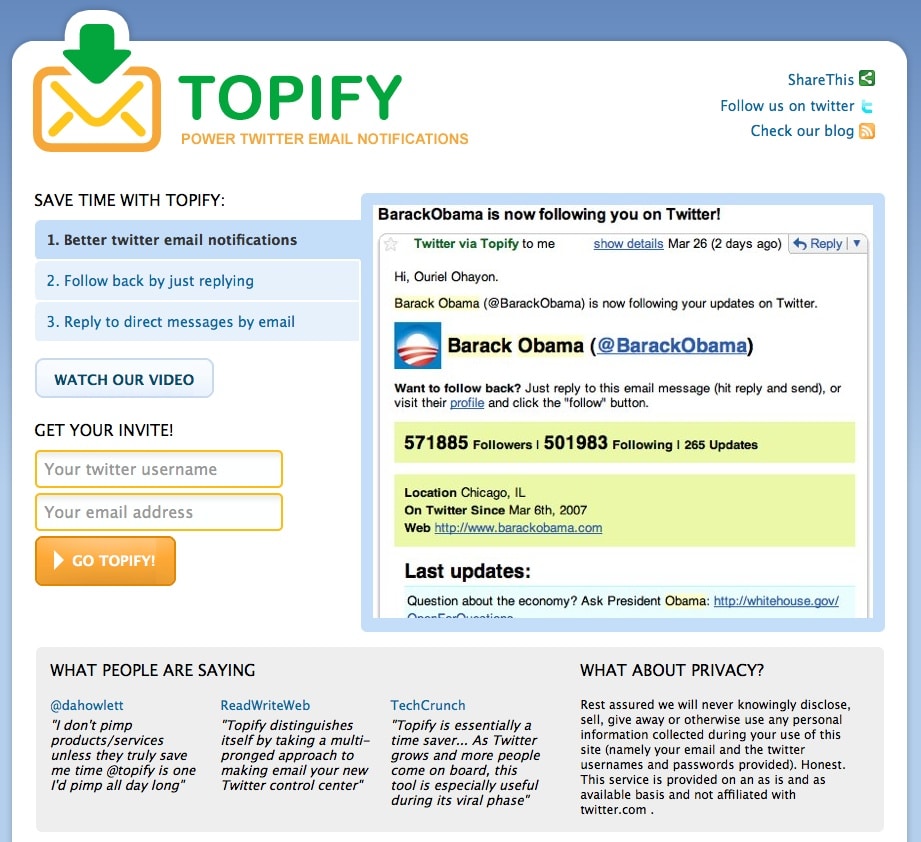
The way Topify works is pretty simple – it takes over your email account from Twitter. It doesn’t hack into your existing email to do so. Instead, you set up your account at Topify and they provide you with a personal email address.
You then go into your Twitter account settings and replace your normal email address with the Topify one.
Once you’ve amended your settings, Topify starts to send you the same alerts from Twitter that you used to get, but to the power of ten. Now, you get to see the user’s bio, their followers/following ratio, when they joined Twitter, their five most recent updates, their website – basically everything you’d see on their Twitter homepage.
Topify then gives you the option of following that user by simply replying to the Topify email. No message needed – just hit reply. You can also send direct messages by replying with your message, or block unwanted users by forwarding that user to Topify.
By giving you all the options via one single email that it could take you several minutes to check out via Twitter itself, you can see why Topify is gaining popularity with Twitter users.
Seesmic Desktop

Up until now, the reigning champion of third-party applications to help run your Twitter account has been Tweetdeck.
Its use of columns, groups and account management has been hugely popular. Now, its time as undisputed champ might be near an end, thanks to Seesmic Desktop.
From the same guys that gave us Twhirl, Seesmic Desktop is more than just a possible alternative to Tweetdeck – it’s better (to me, anyhoo). Here’s why:
- Cleaner layout with fresh neutral colours as opposed to the dark Tweetdeck (although Tweetdeck’s colour options can be changed in the settings)
- Multiple accounts, ideal for users who want separate personal and business accounts
- Excellent Facebook integration
- Better API usage – Tweetdeck limits how many updates you can have per hour, Seesmic seems to avoid this (so far)
- Less memory suck on your system compared to Tweetdeck
- Easier navigation between columns and searches
- Remembers your preferences for URL shortening services and image uploaders
There are numerous other little tweaks – suffice to say, as an alternative to Tweetdeck, Seesmic Desktop comes up trumps. And then some. I love it.
bit.ly
Since Twitter only allows 140 characters per message, you need to optimize your space and make sure you’re not wasting any real estate.
To help with this, there have been a host of URL shorteners that allow you to share a website link without having to post the complete URL. My favourite is bit.ly.
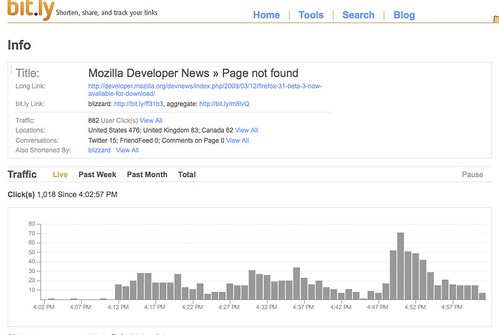
While you can use bit.ly straight from the box, the really good stuff happens when you sign up for an account. Once you’re logged in, you can tweet your link and message straight to Twitter.
You can then track how many times your link was clicked, who by, what’s being said about your link and more. There are also a host of additional tools, including support for Firefox, Gmail, email, Facebook, mobile use and much more.
A really cool feature is bit.ly’s support for Google Documents – you can create a Google Spreadsheet template and convert your links into an Excel report. Of all the URL shortening systems, bit.ly is definitely my favourite.
So these are three great tools – but where does the ROI come into play? There are a few ways:
- Better time management, allowing you to interact with more people, more effectively, building the relationships that could lead to customers/clients
- Keep tracks on the searches that matter most to you, your brand and your customers/clients
- See who’s discussing your links, helping you target warm leads for promotional or sales campaigns
Of course, you don’t need to worry about ROI if it doesn’t affect you.
But, if you’re trying to convince your boss (or client) why they should get on Twitter from a business point of view, and need to convince them it’s not a waste of time and does offer ROI, you could do a lot worse than the three examples here.
How about you? What are you using to better manage your time on Twitter and how are you measuring success?
- Update Friday May 22 – Topify have very kindly released 100 beta invites to readers of this blog. You can get your invitation to try Topify by clicking here.
photo credit: arikfr
photo credit: adamjackson1984
photo credit: Christopher Blizzard
45 Responses to “Better Twitter (and ROI) with Topify, Seesmic Desktop and bit.ly”
Topify is buzzing. Twitter’s recent improvements on new follower and dm alerts is much nicer than before. You can now see avatar photo, followers, following and update numbers. Topify offers more information yet that could be a lot of reading. Since you tout it though that’s good enough reason to give it a look see.
Seesmic Desktop has come a long way. I find it much more useful than Twhirl was. What ‘got me at the door’ though was not the aesthetics, which by the way you can custom tweak in Tweetdeck, it was the opportunity to manage multiple Twitter accounts. That gave it the edge in my book. If Tweetdeck would do likewise then I might be pursuaded back to their camp.
I stumbled on Bit.ly even before I knew it was so cool. I guess there really is a law of attraction!
Thanks for another brilliant piece and for sharing with us.
@DDGriffith
Danny,
Great post and thanks for the props on Seesmic Desktop. The desktop was intentionally launched early to get the instant and appropriate feedback, and so far, we’re really excited and doing our best to listen, learn, adapt and deliver. We’ll be coming out with our next update in a few days (if not sooner). I also appreciate the feedback in the post and comments – having a more integrated bit.ly feature is something we’re looking at.
If you have questions, please go to @askseesmic!thank you for your kind words and glad you like Seesmic Desktop, we have full bit.ly integration coming soon and will keep releasing like crazy!
Great info Danny, I changed over to seesmic on mac and found it interacts with adobe air better. It runs less hotter and We hypothesized at Boston Media Makers Drinkup that it may interact with memory better also.
Topify sounds like Goggle Analytics for twitter which is long overdue.
Thanks always for sharing, You rock.
its a little frustrating when these things are talked about and there is no thing at the beginning that say “HEY DUDE..this is in BETA – you won’t be able to sign up for it yet – you can go sign up for an “invitation” but you can’t sign up for it yet.”
Open. Authentic. Real. There are more articles about this new stuff that comes out w/ no indication that its in fact in beta and you can’t use the tool yet…
James – Sorry for the private-beta thing – we just want to grow the service gradually, so we can make sure that we give everyone the best service they deserve.
Meanwhile, here’s an invite links for you and the rest of readers: http://bit.ly/topifydannybrown
Danny – thank you for the great post! And we sure share the love for the same tools (as you can notice from the link)
Hey there Arik,
Thanks for dropping by, and really appreciate you putting out invites for my readers – way too kind!
Cheers again, and looking forward to watching Topify continue to grow and expand.
Awesome review. Funny we also like Seesmic and Bit.ly at Topify!
Ouriel – Topify
Danny, I thank you for this post very much. As a die hard Twirl fan, the fact that you now like Seesmic was testimony enough for me. I appreciate that you say it’s a relatively easy app for newbies. I think that’s important. We want them to find the neat, new and fun way to use Twitter, so they too can embrace it and quickly grow with it.
I think the bit.ly Google Documents feature is tremendous, and the fact that one can convert it to an Excel spreadsheet is an excellent attribute you brought out. That’s a great way to sell it to management.
Good work, my friend. Thank you, as always, for sharing your wisdom and insight with us mere mortals.
Good day,
~ Lizz
Danny, thanks for this through post. I will take another look at Bit.ly, I agree with Lizz that the Google docs integration sounds great! Griff beat me to the “you can customize Tweetdeck colors to a lighter scheme, but agree that out of the box, easy & useful = Worth checking out. will do so soon.
BTW – which WordPress comments plugin do you use. I was looking at them yesterday, and wanted one that allows peeps to be notified of follow-up comments, and missed it. Thanks
-
To Griff,
I’m glad that you are one of those practicing the Law. Believe, for there really is. Good day!Late to the party…but it’s been a long day.
Love Topify and am really excited about implementing it more into my everyday schedule. Surprised I hadn’t utilized it before to much. Just an awesome service. Thanks for the info Danny
Topify and Seesmic are on my To Do List. Thanks for the descriptions. Bit.ly has been a great tracking tool that I’ve been using for weeks.
Will report back to you after I’ve dipped a toe or two.
Best,
Chris
@chrismingryanLove these 3 tools. They can totally help you dig into ROI.
The trick is pulling it all together in a meaningful way. You think you can create a report template for all of us?
I love TweetDeck and it’s the only one I need right now.
But I love that you love Bit.Ly — I heart it too! What is especially great is that it keeps track of how many times someone has read something you posted.
On the note of topify though — besides that 3rd part app. do you know any other ways to find out your Twitter registration date? I can’t remember mine and I’d like to know!
Great post Danny!Great post, Danny! I’m definitely going to check out Seesmic Desktop and Topify. I’ve always been pretty hot on Tweetdeck, but change is GOOD!
I’ve been using Bit.ly for about a month in my new marketing role, but I have to admit I’m not terribly impressed. I’m pretty stuck on Cli.gs, and I just like the GUI better. I’ve also been frustrated with the pagination of the URLs created on Bit.ly. You have to click through pages of 15 at a time to find previously created URLs; while on Cli.gs you can see all of your URLs in one big list on one page.
Huge fan of bit.ly and Topify. The latter especially has immensely made deciding which new followers to follow back more efficient. Ability to follow back via replying to an e-mail lets me quickly and easily take care of that “task” while out and about on my iPhone. Twitter should really buy them out and integrate it into the default Twitter setup.
I think a lot of new twitter users are overwhelmed by the new follower notifications and having Topify be the default would really help them out.
I use Seeismic sparingly but think I’m on an old version. But with you and David Spinks touting it, will give them another shot but had a bunch of issues with the older versions.


I’ve also switched over to Seesmic as you know and have been very happy for the most part. I haven’t tried topify but may have to give it a shot…I’ve been meaning to be a bit more thorough in who I follow back. I’ve used bit.ly but don’t go to the site that much as it’s just so convenient to shorten the url right in seesmic. Would be really cool if they were integrated so you could post them through seesmic and still view all the stats on the site.