Why I’m Loving the Livefyre Comments System

69 Shares 69 Shares ×

Livefyre comments systemRegular readers of this blog will have noticed the introduction of the Livefyre comment system.

While I’ve written in the past about my reasons to go back to the WordPress comments system, I saw Livefyre in use on a couple of blogs I enjoy and was intrigued enough to check the system out.

While it’s not perfect (and, to be fair, it’s still in beta), having used Livefyre for a week or so now, I’m really enjoying the experience.

So, what’s Livefyre comments all about then?

Comments and Community

On first inspection, Livefyre looks like much like the other main third-party comments systems (Disqus, IntenseDebate and Echo). Looking to combine real-time commenting with building a thriving blog community, Livefyre has all the usual requisites – threaded comments, voting, social sharing, etc.

But it’s when you start using Lifefyre that you can see the goal behind the company – to build a solid commenting community where everyone is “accountable” (this isn’t as Big Brother-ish as it sounds).

By not having the normal Name, Email and URL options, but instead letting you comment either by Twitter, Facebook or your own Livefyre account, the aim is to stop both comment trolls and spam, and improve the visitor experience to any blog with Livefyre installed.

At first, I wasn’t sure about this approach (and raised it in the comments over at the Livefyre blog). However, I can see what the Livefyre guys are trying to achieve with the non-open approach and I do applaud their goal.

And, I have to say, since installing Livefyre, my spam has been zero (I guess spam bots don’t have the patience to sign up for a dedicated account). So, in that respect, the Livefyre approach works.

Real-Time Chat and Replies

Similar to the system that both Disqus and Echo have, Livefyre offers a live comment stream that updates and refreshes as new entries are posted (using the same technology behind Friendfeed). Where Livefyre differs is with the “New Comment” notification bar that pops up when a new comment has been left.

As well as being a cool feature to let you know when someone’s left a new point of view, the immediate advantage this offers is the way that your comment system is now a true, live stream. Think of it as Twitter for blog comments.

When you see the notification, you can jump to the comment itself and hit Reply with your take. This looks similar to Twitter’s “@” option, and will reply directly to that person (or more – Livefyre supports multiple responses).

Livefyre real-time chat comments

If the commenter is still on the site, you can then start a back-and-forth debate all in real-time. Additionally, if the commenter signed in using their Twitter account, then the reply will ping back to them via Twitter and continue the conversation that way.

I’m already thinking of ways to implement this in some upcoming posts, but I think Livefyre’s onto a real winner with this feature.

Checking in to Comments

One of the very cool features that I like is the ability to check into a conversation. This is similar to being notified when a new comment is posted, but with one big difference – you can just follow the conversation without even checking the blog post out.

While this might go against the idea of blog commenting – how can you comment when you don’t know the topic? – it actually expands it. Think about it – you can be down your local sports bar and take part in a conversation about a game, without having seen it. That doesn’t matter – you know the topic and have your own views on the team, player(s), etc.

Livefyre’s check in option allows the same. Many bloggers (myself included) have bemoaned that the likes of Twitter and Facebook could be taking conversations away from your blog and over to these platforms. Sure, your post is being discussed, but unless you follow every outlet you won’t know where and who by.

With Livefyre’s check-in, folks that are connected to your readers can see the conversation that’s happening and jump in to discuss their point of view with their friends. While initially they might not read your post, the opportunity to do so grows with the conversation around it.

This, again, has the potential to be one of Livefyre’s defining benefits.

Other Features

As well as the three features I really like that I’ve highlighted above, Livefyre has a ton of other cool stuff up its sleeve. These include:

  • Comment voting and user reputation (and to give someone a negative vote, you have to use one of your positive votes – a great way to discourage flame wars).
  • Full SEO-friendliness.
  • On-page real-time moderation (Hide Comment or Delete – hide still keeps the comment, just not public, you have to click to open).
  • Ban abusive users.
  • Invite conversations with friends from other networks.
  • Multiple comment moderators and owners.
  • Ability to custom design your comments.
  • Live user count.
  • Email notification of new comments and replies.

So, by the sounds of it, Livefyre is the comment system everyone should use, right? Maybe. Maybe not.

Not Quite Perfect – Yet
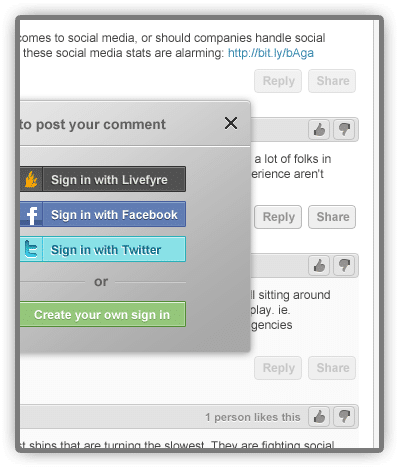
Livefyre sign in optionsAs I mentioned earlier in the post, Livefyre doesn’t allow for generic Name, Email and URL commenting.

You can use Twitter or Facebook to sign up with if you don’t want to open a Livefyre account (though to get the best from Livefyre, an account definitely helps), but you can’t just use a name and email to comment.

While this is great for combating spam and trolls, it might put bloggers off (as well as commenters who don’t want to sign in with Twitter or Facebook, nor create a Livefyre account).

(To be fair, I had my reservations about a non-URL comment system, but so far I haven’t had any issues because of it.)

It doesn’t (currently) support the CommentLuv system either, which is a shame, as this is one of my all-time favourite comment add-ons. Having said that, though, Livefyre CEO Jordan Kretchmer has said he’d love to talk to Andy Bailey (the CommentLuv creator) to see what can be done.

Also, because you have the option to delete your comment (or restart it to correct mistakes), it can lead to duplicate comments. This is only in the blog dashboard, admittedly, but it can throw comment counts off until you delete the non-comment.

It also seems to share the same “bug” that Disqus often has, in that when you click on “Read Comments” (or similar) at the top of a blog post, you aren’t automatically taken to the comments area. However, this could be a bug that will be ironed out when Livefyre comes out its beta stage.

I’d also like to see some way that comments made on Twitter or Facebook (or other social networks) could be seamlessly transferred back to the blog post and into the bigger conversation for true social integration, as opposed to the social mentions approach that Disqus has. Livefyre have said they have some cool upcoming features, so who knows?

Should You Use Livefyre?

So, I guess the main question that’s left is should you use Livefyre when it’s out of beta?

As someone who’s previously spoken on why I don’t use third-party comment systems, I have to say Livefyre has changed my mind. Not only are all your comments saved to WordPress in case you want to change back, all the threaded discussions are saved as well, so the comments don’t look funky if you switch Livefyre off (something all too obvious when moving away from Disqus).

Also, while the idea of a velvet rope comment community seems at odds with “normal” open comments, Livefyre doesn’t actually feel like a closed community. With more than 500 million Facebook users, and 150 million Twitter users, even if you don’t want to create a Livefyre account you should be covered.

And the immediate effect on spam and comment trolls can’t be discounted (though I’ve been hugely fortunate with the great community here when it comes to comments and respect).

The system is also mobile-friendly, which isn’t always the case with other third-party systems (I tested with my BlackBerry browser and had no issues).

My take? If you like the idea of real-time chat and a comments system that fosters respect and accountability, as well as a ton of other cool features, Livefyre is the best third-party option around.

Even if you’re not a fan of anything but standard WordPress comments because of the “overkill” options that can happen with third-party comments, Livefyre offers a really clean solution that’s almost the next best thing to vanilla WordPress comments.

The service so far has also been awesome. Combine that with a pretty cool product, and you can’t ask for much more than that.

In that respect, I can’t recommend Livefyre enough.

If you’re interested in signing up for the beta of Livefyre Comments, hop on over to the homepage and you can request it there.

  • Note – Livefyre is currently available for the WordPress (self-hosted version) platform, with TypePad and Tumblr versions to follow.
  • Update: I’ve since reverted to the vanilla WordPress comments as part of my blog redesign.

Join over 11,000 smart subscribers

Get my latest updates delivered straight to your Inbox as soon as they're published (I respect your privacy and will never spam you)

69 Shares Twitter 43 Facebook 22 Google+ 2 Buffer 0 Buffer LinkedIn 1 Email -- Email to a friend 69 Shares ×
About Danny

Danny Brown is Chief Technologist at ArCompany and an award-winning marketer and blogger. His blog is recognized as the #1 marketing blog in the world by HubSpot. Danny is also co-author of Influence Marketing: How to Create, Manage and Measure Brand Influencers in Social Media Marketing.

76 comments
Sort: Newest | Oldest
regis
regis

I tried it on my blog in september too, and I thought it was not really fast. Also after jaiku was bought and killed by Google, and same destiny happend to Friendfeed, I think I'm going to really on myself with free software only.

Danny Brown
Danny Brown moderator

@regis Hi Regis,

Since September, the system has been hugely optimized and is a lot faster.

Ari Herzog
Ari Herzog

You say that since installing Livefyre, spambot comments have been eliminated. What about human spammers, writing about pharmaceuticals and sex? Do they come through? How often are you spamming regular comments?

Danny Brown
Danny Brown moderator

@Ari Herzog If you have a determined spammer, they'll still get through. Though I don't seem to get any pharma or sex spammers anymore - more "Use this number 1 website traffic tool" or some other crud.

As an example, over at For Bloggers By Bloggers where I have the standard WordPress comments system with Akismet, I'm cleaning out about 20+ spam comments that have been caught in the filter every day.

Here, where I'm using Livefyre, I have zero in the filter (with the exception of possible spammy backlinks). So from a spam point of view, Livefyre delivers in spades.

But it's the social interaction and the genuine (from what I've found) encouragment to build a conversation that I'm consistently being impressed with.

Now, if only @livefyre can get a Recent Post option as well as the true social comments integration (and @jkretch has mentioned this is on the way), I'll be 100% happy camper ;-)

PhilipNowak
PhilipNowak like.author.displayName 1 Like

Great post Danny. I integrated Livefyre into my personal blog recently and am looking forward to testing it out. It definitely has some annoying quirks, but I do like the potential virality as a result of the social network integration and real-time comment stream.

Switching topics, are you using the Sharedaddy plug-in for your social bookmarking icons at the bottom of your posts? Additionally, can you share how you created the "Mashable-esque" floating social bookmarking icons on the side of the blog post?

Thanks!

Danny Brown
Danny Brown moderator

@PhilipNowak Agreed, Philip - I've been extremely impressed with the way @jennalanger and the @livefyre team are always "there' whenever they need to be (and often when not).

Digg Digg has a lot of great options for placement of the buttons - I might look at hard coding for when my blog revamp is done (to keep plug-in calls down), but for now I like the options if gives.

PhilipNowak
PhilipNowak like.author.displayName 1 Like

@Danny Brown Danny, thanks for the info on Digg Digg. I will definitely check it out. @jennalanger Jenna, thanks for following up with me. You and the rest of the Livefyre crew are lightning fast with your response time. I really appreciate that and look forward to checking out the new features that Livefyre rolls out.

jennalanger
jennalanger moderator like.author.displayName 1 Like

@PhilipNowak @jkretch Hey Philip, as you know we've added a ton of features since you installed and we're continuing to work on the product with help from people like @Danny Brown Feel free to send any feedback my way (jenna at livefyre dot com). Thanks for giving the details on the Digg Digg plugin, I've tried several sharing plugins and I can't find one I really like. I'll give this a go!

Danny Brown
Danny Brown moderator like.author.displayName 1 Like

@PhilipNowak Hey there Philip, thanks, and glad you enjoyed the overview. :)

Have you spoken with either @jennalanger or @jkretch about the issues you're having with Livefyre? They're usually pretty on the money and have been amazing support-wise when I've had issues (even when they haven't been Livefyre's fault). I agree, hearing about the upcoming features (and the new ones they just released, like the social network integration) makes me pretty excited to see how the platform evolves.

Both the social media sharing options (bottom of post and floating sidebar) are powered by the Digg Digg plug-in:

http://www.mkyong.com/blog/digg-digg-wordpress-plugin/

The configuration I have is Floating Enabled and Normal Enabled (with After Content for the Normal configuration). It'll make more sense if you activate the plug-in, you'll see what I'm on about :)

JonHearty
JonHearty like.author.displayName like.author.displayName 2 Like

After using @LiveFyre for a week I am impressed not only as a blogger but as a commenter. I wish more blogs had it! Not being able to comment with just a name and URL weeds out trolls and forces relevant comments.

Danny Brown
Danny Brown moderator

@regis @JonHearty I've used a ton of systems (WordPress core with plug-ins, Disqus, IntenseDebate, Facebook Connect, Echo) and I can't see anything that competes.

With WordPress core, you have to add plug-ins to get the functionality of Livefyre. Also, I had a special interactive, live Q&A session on my blog a couple of days ago, and it was a huge success that WordPress comments could never have offered the same results:

http://dannybrown.me/2010/12/10/livefyre-future-of-blog-comments/

For me, the options and possibilities with Livefyre outstrip any other system (core or otherwise). But that's just me - everyone's different. :)

regis
regis

@JonHearty I wonder why do you think it is better than the Wordpress commenting system, for instance?

Danny Brown
Danny Brown moderator like.author.displayName 1 Like

@JonHearty Agree completely, Jon, and it's just one of the reasons I'm starting to feed it over to my other sites. Hopefully once it's out of beta and more people get their hands on it, it'll pick up really quickly. I heard nothing but great things from folks who were treated to a run-through at the recent BlogWorld Expo. :)

Gwen
Gwen

Can you use livefyre on blogger?

jennalanger
jennalanger moderator like.author.displayName 1 Like

@Gwen Not quite yet, but we are working on a plugin to make it a super simple integration. Feel free to sign up for our private beta at http://livefyre.com and we'll let you know when it's set for blogger. Thanks!

mmangen
mmangen like.author.displayName like.author.displayName 2 Like

Danny - I'm glad you addressed the CommentLuv issue in this post because that is one thing I love, love, love, love having on my own blog. I'm hoping that Livefyre can work things out with Andy, because then I would def switch over. Being able to see where the conversations are taking place (Twitter, FB, etc) and the reduction of spam are two attractive reasons to switch over.

jennalanger
jennalanger moderator like.author.displayName 1 Like

@JermaineYoung @mmangen Thanks for the feedback. We're working on a CommentLuv solution and we're continuing to add features all the time. If you have any other requests, let us know so we can add it to our list! We want to cover all the bases and give you the features you want. Thanks again!

mmangen
mmangen

@JermaineYoung LOL your comment about 3rd party systems leaving out one thing or another is exactly how I feel about Twitter clients. I want the "Holy Grail"!

JermaineYoung
JermaineYoung like.author.displayName like.author.displayName 2 Like

@mmangen If LiveFyre gets comment love and an effiecient "trackback" system then I'm sold. My only gripe with all of the 3rd party comment systems is that they all leave out one thing or another. I love Disqus for its track backs and integration in social media but it doesn't support comment luv to my knowledge. If LiveFyre gets this right then that will be my #1 choice.

Danny Brown
Danny Brown moderator

@mmangen I saw Jordan reach out on Twitter to Andy, so fingers crossed, Michelle - it'd be a great addition to an already cool comment system. :)

dannydev
dannydev like.author.displayName 1 Like

I added livefyre to my site last week and have already been thoroughly won over it creates a much more conversational response to posts and lends itself more to the blogger answering questions and interacting with their audience

Danny Brown
Danny Brown moderator

@dannydev Agreed, Danny, and I must admit, I do like the mindset of commenters being "accountable" - makes for a much better community all round for all blogs.

Sushi
Sushi like.author.displayName like.author.displayName like.author.displayName 3 Like

Excellent review, Danny. You've definitely covered a lot of bases with it and answered some questions that new users may have, which is great. It's really hard to jump back into a conversation after leaving a comment on a blog with a traditional commenting system (really, how many posts do you return to after commenting?). LIvefyre's a new way to start checking back.

Danny Brown
Danny Brown moderator like.author.displayName 1 Like

@Sushi Thanks Sushi (and I see you're interning at Livefyre, cool).

Unless you use the plug-in to subscribe to comments, or sign up to a comments RSS feed, vanilla WordPress isn't always conducive to continued conversations. Looking forward to seeing how Livefyre grows this.

Dom
Dom like.author.displayName like.author.displayName 2 Like

Love livefyre, when Jordan first demo-ed it for me I was really excited and it seems to really be coming along well. Best of luck with it!

GrantGriffiths
GrantGriffiths

Without scanning all of the comments here, which my question may be answer in. Where are the comments stored? On your own site or livefryre's?

Danny Brown
Danny Brown moderator

@dz Cheers fella. Yep, latest version, still had the threading "issues".

One of the things I was curious about with Livefyre (as mentioned in the post) was how my community would "react" to a velvet rope "sign-in" option. The last thing I want to do is lessen the experience and enjoyability that (I hope) visitors here get.

However, it seems to have been less of an issue than I thought it had the potential to be, so that's been nice. And with the Google and LinkedIn approaches coming soon, that should mean less of a barrier, while still "protecting" the blog and blog readers.

Which is nice. :)

dz
dz like.author.displayName 1 Like

@Danny Brown @bobbylent We've been rapidly improving and iterating our Wordpress plugin, so make sure she's using the latest version.

FWIW, Disqus does allow the community owner to require sign in via any of the supported methods. But not all owners want that barrier, which is why you see many places using Disqus allowing anonymous comments.

Danny Brown
Danny Brown moderator like.author.displayName 1 Like

@bobbylent Mainly the ones I mention in the post, Bobby.

The fact that it's encouraging accountability in comment systems is something I admire. Anything that improves the user experience while on a blog is all good, and you only need to look at the likes of TechCrunch and Mashable for examples of crappy anonymous comments.

While smaller blogs may not have this issue, it still makes for a more welcoming blog. At least that's my take, fella. :)

And the non-spam (so far)? More bonus points. :)

Danny Brown
Danny Brown moderator

@dz Hmm, I'll have to double-check my wife's blog as runs Disqus (version 3.0) and she had issues with the threading back to WordPress when she turned off. Cheers for the heads-up, though :)

dz
dz

@Danny Brown @jennalanger Right, that's actually what I mean. The current Disqus Wordpress plugin will write back the threads to Wordpress's native comment system, meaning that if you disable the plugin, all the threads will still be intact and display correctly.

Apologies that it wasn't true when you tried out Disqus a year back! We're improving and listening to feedback as much as we can :)

Danny Brown
Danny Brown moderator

@dz That's not what @jennalanger nor myself were talking about. You're correct in that Disqus (and Intensedebate as well as vanilla WordPress) supports threaded comments.

The issue is when you want to turn Disqus off, and either change systems or go back to WordPress-powered comments. All the threaded conversations on Disqus are not carried over, so you essentially have inidividual comments now (which lose meaning as you try and join up who replied to what).

Hope that clears things up :)

jennalanger
jennalanger moderator

@Danny Brown @GrantGriffiths Yup, we've seen several requestions for deeper levels of threading, and it's on the way :) Disqus still doesn't maintain threading if you go back to WordPress, I recently checked it out.

Danny Brown
Danny Brown moderator like.author.displayName 1 Like

@GrantGriffiths Where I prefer it over Disqus is the continuation of threaded comments, even if you turn Livefyre off, mate. When I switched back to WordPress from Disqus last year, I lost all the threaded conversations, they turned into single comments instead. They may have fixed that since then, but was a major bugbear for me at the time.

GrantGriffiths
GrantGriffiths like.author.displayName 1 Like

@jennalanger I figured that was they way you were doing it. Same as Disqus. So far, just from using Livefyre here, I do like it.

jennalanger
jennalanger moderator like.author.displayName like.author.displayName like.author.displayName 3 Like

@GrantGriffiths Hi Grant, thanks for the question. All of your comments stored by Livefyre and are written back to the WordPress database immediately. You own all of your data, and if you ever turn Livefyre off all of your comments will remain intact, threaded replies and all.

Trackbacks

  1. [...] systems that require some acknowledgment of who the commenter is, this is not much of an excuse. (Danny Brown talks about the big ones here). But then again, that doesn't stop someone from being a d-bag in their [...]

  2. [...] Coltzilla.com dannybrown.me Drinkoftheweek.com blogging.la asiajin.com Spinsucks.com DannyDev.com Media140.com [...]

  3. [...] now Livefyre presents itself as a comment system for blogs and publishers, but the vision is to turn it into a far more robust system for inspiring [...]

  4. [...] after Danny Brown trialed the system and touted why he loved Livefyre, everyone from Gini Dietrich to Patrick Phillips and Shonali Burke pointed out positive impacts on [...]

  5. [...] Why I’m Loving the Livefyre Comments System @ DannyBrown [...]


69 Shares Twitter 43 Facebook 22 Google+ 2 Buffer 0 Buffer LinkedIn 1 Email -- Email to a friend 69 Shares ×