Blog Comments and Experimentation – Or Why @Livefyre Is Here to Stay

79 Shares 79 Shares ×

Livefyre comments system

So, if you’re a regular reader of this blog (and thank you!), I think I owe you an apology for any dizziness I may have caused you in the last couple of months.

As a regular visitor, you’ll know that I’ve been experimenting with what comment system to go with – native WordPress (in use for the last couple of weeks), Disqus (in use for about 6 weeks prior to that), or Livefyre (in use again now, and a system I’ve raved about many a time).

The reason for this was simple – user experience here is key. You take the time out of your day to come and spend some time here, when you could be choose from a million other blogs at that given time.

For that, I thank you. And to extend that thanks, if you like, I want to try and make your stay here as enjoyable and user-friendly as I can.

That’s the reason behind choosing the Genesis framework and the Optimal child theme (affiliate links). Since activating them a few months back, folks have been kind enough to comment on the easy navigation, and the responsive design makes it very easy to read on mobile browsers.

That user experience extends into the comments – I want to encourage you to share your thoughts, and extend the conversation beyond the post and with each other.

This is kind of where native WordPress comments falls down, and leaves both Livefyre and Disqus ahead. All you need do is compare a post where there are a lot of comment threads, and you can soon get lost with native WordPress, wondering who’s replying to who.

Not so much Livefyre and Disqus, where you can clearly see the thread and who the conversation is aimed at.

And, for a while, I was thinking of sticking with Disqus as I experimented with the new 2012 version – it’s very slick. Community comments, popular conversations elsewhere and a beautiful interface make it a very tempting platform. And yet…

Here we are, back with Livefyre, and this time it’s for keeps, for a few simple reasons.

Livefyre Support is Awesome

If there’s one area that Livefyre excels at, it’s their customer support and community support team. It must be a culture they have over there – from Jenna Langer to Jeremy Hicks, and current Community Manager supreme Dhara Mistry, Livefyre clearly encourages interaction at a very high level.

While I was experimenting, I had some issues on switching Livefyre back on, due to a minor conflict with Disqus and some WordPress avatars. I also couldn’t fully sync comments over that have been left during my activation of Disqus.

Step up Livefyre, and Dhara and her team of engineers.

Dhara Mistry

Click image to enlarge

They worked way beyond what any support would normally offer and ensured all the glitches were fixed. Not only that, Dhara kept me up-to-date at every touchpoint, and even recommended I hold off until they locked down a fix for my specific needs.

All this while rolling out a brand new version of their commenting system, as well as fielding questions and support tickets from users with Livefyre currently installed on their sites.

This kind of service and constant communication is a huge factor for me when it comes to any business, and the fact Livefyre don’t even charge the majority of its users, yet still offer that kind of support? I’m sold.

Livefyre Is The Natural Evolution of Blog Commenting

As I mentioned earlier, I’ve been a rabid fan of Livefyre since it launched, and was one of the early users of the platform.

I love its real-time chat system as well as the social media integration of conversations from Twitter and Facebook, as well as the ability to share across multiple networks.

But that was Livefyre back then – the recently-released beta version of Livefyre 3 shows you exactly where this platform is heading, and I love it. You want your blog comments to be truly social and interactive? Check out what Livefyre has for you.

Social Comments Integrated

Livefyre social comments

Click image to enlarge

With the previous version of Livefyre, they already had a pretty cool way to bring conversations from Twitter and Facebook into your comments section. If someone tweeted about your post, and added extra commentary, or it was shared on specific Facebook Pages, these would be pulled into the post at the end of the comments.

Now, however, they fall neatly into the comment stream itself, based on timestamp. And, if you reply back via the comment, it goes back to Twitter automatically, to answer the person that shared. Further conversations continue to fall back into your comments – very cool.

Rich Text Editor

Livefyre rich text editor

Click image to enlarge

One of the biggest “gripes” of the previous version of Livefyre was the inability to make your comment more dynamic. While the likes of WordPress and Disqus allowed you to drop HTML in to add bold, italic or other font edits, Livefyre was stuck with its standard font.

Not any more. Now you have a rich text editor that allows you to choose bold font, italic, underscore, insert a hyeprlink, bulleted lists and numbered lists.

Additionally, and one that a lot of commenters and bloggers were asking for, is the ability to edit your comment if you make a mistake. However, this only works if the blogger with admin duties enables this feature on Livefyre.

It may be small changes, but these features make comments more dynamic and highlight the parts that need to be highlighted.

Livefyre Supports Rich Media

Probably one of my favourite new features is the way Livefyre 3 truly turns your comments into a fully-fledged multimedia experience.

Normally, when you leave a comment on other blogs that don’t have Livefyre, and you want to show a video or image, you have to grab the link to YouTube or Flickr, and then the reader of your comment has to click through to see what the video or image is.

Not with Livefyre.

Instead, they keep your readers engaged on your blog by embedding the rich media directly into the comments area.
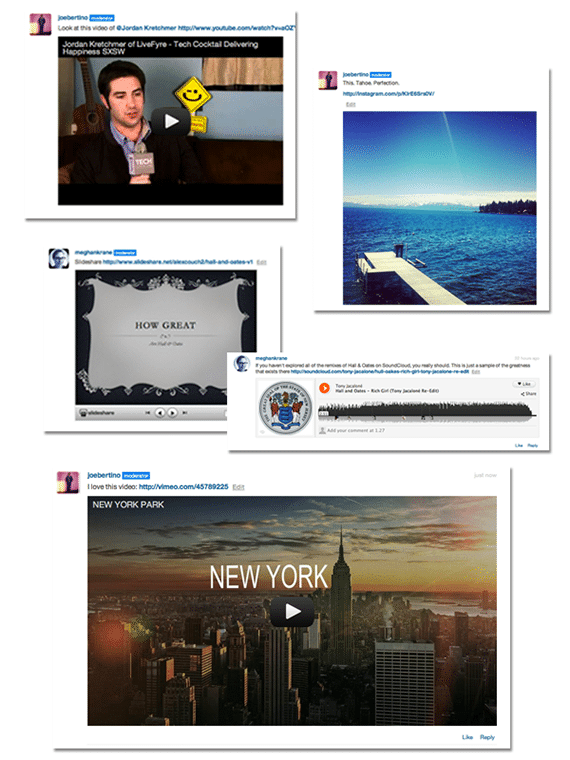
Livefyre rich media embed

Click image to enlarge

Currently supported platforms include YouTube and Vimeo (video), Flickr and Instagram (images), Slideshare (presentations), SoundCloud and Spotify (music), animated GIFs from MySpace and Wikipedia (the articles appear in-stream).

To show this media content, simply grab the URL of its parent page and drop alongside your comments, and Livefyre does the rest. It’s pretty damn cool and can make for a very entertaining comments section.

Livefyre and Multi-Site Admin

One of the new features that came out before the current beta version of Livefyre 3 was the revamped admin area for bloggers.

Livefyre Site Moderation

Click image to enlarge

Now, instead of having to hunt through reams of comments to filter one out, you can search directly by username, IP address, if it was a user logged in via Twitter or Facebook, keywords, and much more.

You can choose to do this while having all your sites open, or just one domain at a time. You can also quickly check if any comments have been filtered into pending or spam, ensuring all comments you want approved are done so.

It’s a slicker version of the previous admin area and a very welcome addition to the product.

So Is Livefyre Perfect?

Is anything? Okay, I know, glib answer and I apologize, because we all know Jessica Alba is perfect… Moving on!

As I mentioned, Livefyre 3 is currently in beta, so the version being used on blogs currently is one that will experience some hiccups as the platform moves into a wider public release.

Some of the current glitches, from my own use and conversations I’ve seen online, include:

  • The SocialSync tagging doesn’t always work the way it should, meaning you can’t tag your friends on Facebook and Twitter (by using the “@” symbol and then typing their name until it appears). For a social commenting system, this is a core part of Livefyre’s appeal.
  • Sometimes it looks like there’s no comment box, whereas it’s just Livefyre rendering. The load time has been improved from the previous Livefyre, but could sill be optimized further.
  • Styling Livefyre to suit your blog design requires CSS, and not every blogger is comfortable with this. The advantage of Disqus in this respect is it inherits the font, style and design from your blog, so should match up every time.
  • It’d be great to see your commenters’ activity across the web without having to click on their profile. A lightbox when hovering over the username would be great, and encourage commenters to visit other blogs in the Livefyre family.

In fairness, the last two are personal choices as opposed to glitches, but I feel they’d make the platform even more complete than it is currently, and its current iteration is pretty damned impressive.

So, Livefyre Is Here to Stay Then?

As I mentioned at the start of the post, if you’ve felt a little dizzy recently with the comment system changes, I apologize. But it’s the last time it should happen.

I’ve been an early supporter of Livefyre and the platform has continued to grow way beyond its potential from its early days. That continues to be the case as new features and slicker processes get added, and it’s definitely my commenting platform of choice.

Mind you, I have to take my hat off to Disqus – they’ve really upped the game with Disqus 2012, and the interface and integration is very slick. Plus, they also sent out a very fun Welcome package of Disqus goodies – thanks, guys!

But, I have to say, Livefyre just feels what a comments system should be – live, interactive, media-rich, socially-enabled and much more. Simply put, it feels like home.

And, as a blogger, that’s all I can ever ask for from a comments system. Here’s to the conversation.

Update: After feedback from my readers, I switched to Disqus 2012. You can find the full feedback here.

Join over 11,000 smart subscribers

Get my latest updates delivered straight to your Inbox as soon as they're published (I respect your privacy and will never spam you)

79 Shares Twitter 41 Facebook 9 Google+ 2 Buffer 20 Buffer LinkedIn 7 Email -- Email to a friend 79 Shares ×
About Danny

Danny Brown is Chief Technologist at ArCompany and an award-winning marketer and blogger. His blog is recognized as the #1 marketing blog in the world by HubSpot. Danny is also co-author of Influence Marketing: How to Create, Manage and Measure Brand Influencers in Social Media Marketing.

157 comments
8-Bit Dave
8-Bit Dave like.author.displayName like.author.displayName 2 Like

I think DISQUS is really good but I have had problems trying to install and sync up my comments.  I have never had a problem with Livefyre and like you said the support is top notch.  I use Livefyre at my site.

I do wish that more sites would use @Livefyre.  

Jonathan Bowker
Jonathan Bowker

Hi Danny, is it possible for users to register as users on your site as well as LF when they register to make a comment. The reason I am asking is because I would like to grant my users access to private areas of the site and double registration is a pain.

Latest blog post: Tweet Streams

Mike Brady
Mike Brady

I get a "pending" comment right after I hit the send key when I comment on some sites that use livefyre. This seems to be automatic, with no effort to read what I wrote. How can I work around this , so I can get back to blogging.Any help here woukd be awesome. Thanks for your time.....

stock market tips
stock market tips

Thanks for sharing this information. I found it very informative as I have been researching a lot lately on practical matters such as you talk about..

222
222

test

Ethical Behavior Boy
Ethical Behavior Boy like.author.displayName like.author.displayName 2 Like

@Danny Brown You mentioned a lot of good points.  I installed the system yesterday for some of the same reasons you mentioned.  

My readers are concerned about their links being lost, I am sorry about that.  I think it is a good experience for my blog and readers.

We will see.

I am looking for more livefyre blogs, drop my blog to let me know about yours,  I return comments.  www.ethicalbehaviorboy.com

wmwebdes
wmwebdes like.author.displayName 1 Like

@Ethical Behavior Boy @Danny Brown Just visited your site Michael and your comment area only shows as a thin bar.

I've seen this problem on a few Livefyre sites and it was the main reason I switched back to native WP comments.

Ethical Behavior Boy

@wmwebdes Thanks for visiting my site and the notifications, I will work on it with customer service.  thanks

wmwebdes
wmwebdes

@andrea_ Never got to the bottom of it with Livefyre - I just reverted back to native comments.

The thing was you couldn't reproduce it at will and most people assumed it was the browser, but I saw it on IE and FF - never tried it on Chrome, which is what I use now.

I know that IE is rubbish, but lots opf people use it in the UK.

At the time I saw it on a few sites, but I've not seen it for some time.

I sent Danny a screenshot just to show that I wasn't going round the twist.

andrea_
andrea_ like.author.displayName 1 Like

@wmwebdes I wonder if it just a matter of the widget taking a bit longer to load.

Now that I think about it, just the other day one of my readers said something similar, but we couldn't reproduce it and nobody else said there was a problem. Don't know...

Ethical Behavior Boy
Ethical Behavior Boy like.author.displayName 1 Like

@wmwebdes Thanks for your help, it seems like there are two different versions.  I am still new so maybe it will work itself out.

andrea_
andrea_

@Danny Brown I am on a mac as well, but using an Italian keyboard. Strange...

I don't have this problem anywhere else, but on LF3. Very odd indeed... 

Danny Brown
Danny Brown moderator

@andrea_ Ah, got it - what settings do you have your keyboard on? I'm US English on a Mac, using Firefox 15, seems okay. :)

andrea_
andrea_ like.author.displayName 1 Like

@Danny Brown , no, I mean the keyboard I use to type this message:)

For example if I press the double quote key (which I am still trying to locate...) I get instead @. 

It is fine on Chrome or Safari, but not on FF15 (for some reason...)

Danny Brown
Danny Brown moderator

@andrea_ Sorry, mate, not quite sure what you mean re. "keyboard" - is this the box when commenting?

andrea_
andrea_

@Danny Brown, have you had problems with the keyboard ans LF3?

I have made the switch, but my keyboard is kinda mixed up... (I can see it here as well...). For example... where is the double quote key? :D

I have told Dhara and she is looking into it, but I was wondering if you have heard of anybody with the same problem.

Danny Brown
Danny Brown moderator

@wmwebdes @Ethical Behavior Boy Yep, that's Livefyre 3.17, versus the newer version. However, I can see it fine when I click through to the site.

Funnily enough, the older version does seem more stable than the new beta version on this blog. Hopefully Livefyre 3 will work out its quirks soon and be just as solid. :)

wmwebdes
wmwebdes

@Ethical Behavior Boy Danny had the same problem on one of his sites some time ago, but I've not seen it for ages.

Are you using an old version of Livefyre?

Worob
Worob

@C_Pappas @DannyBrown I did - leaning towards that

DannyBrown
DannyBrown

@Worob @C_Pappas Thanks, Christina - the @Livefyre team are also really helpful, Andrew, great at walking you through. :)

rdopping
rdopping like.author.displayName 1 Like

Danny, 

For a guy who is admittedly a novice tech dude (well, you did call me a luddite at one point - jokingly, I hope) I think Livefyre is awesome. I have had simple support issues and they have gotten back to me quickly and I am not a huge user (small following). For that alone they have my vote. 

The fact that it is super easy to use, comment and you get responses to your comments in email allows for the stuff that makes blogging fun; engagement and conversation. The problem with the other major service is that I have to go back to the sites I visited to see if I have had any responses to my comments. 

Danny Brown
Danny Brown moderator like.author.displayName 1 Like

@rdopping That's one of the things I really like about them, mate. Sure, they have business customers but they know the community is just as important, and they're always here for us. Can't ask for much more than that.

shuron
shuron like.author.displayName 1 Like

Hello, very nice blog here. I can agree livefyry support is ubiquitos. Allready waiting WP-Plugin becomes production ready.

Tinu
Tinu

@DebraBraschel Thanks Deb! I love Livefyre, despite its (few) faults.

DebraBraschel
DebraBraschel

@Tinu Hope you're doing well, Tinu. Have a blessed day!

Livefyre
Livefyre

@christinekorda Thanks for sharing @DannyBrown 's article - let us know if you have any questions about @Livefyre, we're here to help!

andrea_
andrea_ like.author.displayName 1 Like

Right.... here it goes again:)

I have a (for now) pretty small blog in Italian, but despite that the assistance I got from Dhara and Jeremy was very good. No doubt the service offered to bigger and paying customers will be better, but that doesn't mean that I am not perfectly satisfied.

The reason I went for LF (and why LF is going to stay on my blog) is the FB integration that allows me to import a good number of conversations that take place there and that would be otherwise (pretty much) lost. What I am not clear is how this is going to work on LF3 if all the comments are imported in the stream... I fear it might be difficult to understand what is going on if the FB comments are scattered all over the place. However, if it were possible to comment on FB from my blog, that would be AWESOME (but the timing has to be improved as now it takes even more than 24 hours for the FB comments to load)

Some of my lot have found the registering process a bit daunting and felt it was kind of intrusive (the linguistic barrier doesn't help, but I do know that being AFAIK the only blog in Italian I cannot expect a localized version just for my own benefit). Certainly what does not help is the confusing way guests may comment, but this has already been discussed. In my view the commenting from guests should be streamlined a great deal so that it is a bit more similar to what the native wordpress comments makes you do. Disqus does that to some extent, but then you are catapulted into another window asking this and that and here is where the magic is lost.

In any case, I am more than satisfied both with the product and the service and would not hesitate to recommend it. The system does need tweaking here and there, but I can clearly see the advantages it has to offer. As an example (and inspired by this very blog) we are about to host our first (hopefully of many) Q&A session.

Danny Brown
Danny Brown moderator

@andrea_ Hi Andrea,

That's a good question - to be fair, I haven't seen any Facebook Comments import into my stream yet, so I'm not sure if that's still one of the glitches (I know they'd mentioned before that Twitter was working fine with the SocialSync, but Facebook was experiencing some quirks).

However, having said that, if it works like Twitter does, it should be okay, since they would still come across as independent parts of the comments, much like normal Livefyre ones do.

Cheers! :)

andrea_
andrea_

@Danny Brown, hhmmm not sure that would work. In Twitter you can hit 'reply' (where on hearth is the double quote key?), so the comments would be linked together in a meaningful way, but alas in FB you don't have such a luxury at your disposal. Say, I could be replying in two hours' time to the latest FB comment but in the comment stream that could appear three pages down the line, making it meaningless (didn't manage to express myself really... need a coffee:) ). We shall see what the powers that be say about it:)

Anyway, I wanted to say there is something wring with the mobile version of your site. The comments are cropped to the right, so that the last 1-2 letters are missing from every line and there is nothing I can do about it. Not sure where the problem is, but in FBBB, with LF2, I don't have this problem.

Cheers.

Danny Brown
Danny Brown moderator

@andrea_ Hi again Andrea,

How about now? @Dhara Mistry just sent me over some CSS to drop in that should solve right indent for both web and mobile version.

Might have to clear your cache first!

andrea_
andrea_

@Danny Brown Hi there, i hadn't realized that FBBB was on LF3... It looks like LF2.

Anyway, I am on my iPhone now and FBBB looks just fine, here instead it is difficult to read what is going on as the right hand edge of the comments is missing.

Danny Brown
Danny Brown moderator

@andrea_Yep, already made them aware, Andrea, thanks - FBBB also uses Livefyre 3, may be an old post you were looking at prior to switch?

andrea_
andrea_

One thing I think should be improved is the level of indentation nested comments can withstand. 4 I feel is way too few: even here if you look below you reach a point in the discussion where you don't really know who is talking to whom. Probably the indentation could be made smaller to make room for more levels (just now I was looking at a blog where the (Genesis?) theme allowed at least 8 levels, but in that case the avatar was on the right). Anyway, compared to the Vanilla standard we are still way better off:)

andrea_
andrea_

@dhara mistry (why isn't your name highlighted?), I have tried to comment twice already, but alas I hit the backspace key by mistake (I use a Magic Mouse, so it is quite a common occurrence :( ), which means that my lengthy comment was lost. Will try again, but perhaps this is something that at HQ you might want to address, assuming it is at all possible...

Dragon Blogger
Dragon Blogger like.author.displayName like.author.displayName 2 Like

For some reason @Livefyre still hasn't offered Comment Version 3 for my site yet, I do want to use it and think it's release has been quite delayed for the general public.  IOverall, I did a similar test on my poetry blog a few weeks ago and switched back to Wordpress commenting with CommentLuv but found immediately SPAM and moderation time was increased and after 3 weeks switched back to Livefyre.  Do you still find bugs in the new commenting version?

Danny Brown
Danny Brown moderator

@Dragon Blogger Hi mate,

Yep, there are still some minor glitches (for example, when I used the media insert yesterday, it appeared as a brand new comment at the top of the post, then later dropped into the reply it should have been). 

Good news is, Livefyre always seem to be on the ball, whether it's @Dhara Mistry or Meghan just above. :)

meghankrane
meghankrane moderator like.author.displayName 1 Like

@Dragon Blogger Hi Justin, we've been rolling out Comments 3 on a site-by-site basis outside of the public beta  program so that we can address any configuration issues with the best customer support possible. I'd love to talk to you more about installing Comments 3 on your sites. We'll be in touch with you shortly. Thanks for sharing your feedback, we can't wait to see Comments 3 on DragonBlogger.com.


79 Shares Twitter 41 Facebook 9 Google+ 2 Buffer 20 Buffer LinkedIn 7 Email -- Email to a friend 79 Shares ×