• Skip to primary navigation
  • Skip to main content
Danny Brown

Danny Brown

podcaster - author - creator

  • About
  • Podcasts
  • Journal

Archives for September 2012

Blog Comments and Experimentation – Or Why @Livefyre Is Here to Stay

Community conversations

So, if you’re a regular reader of this blog (and thank you!), I think I owe you an apology for any dizziness I may have caused you in the last couple of months.

As a regular visitor, you’ll know that I’ve been experimenting with what comment system to go with – native WordPress (in use for the last couple of weeks), Disqus (in use for about 6 weeks prior to that), or Livefyre (in use again now, and a system I’ve raved about many a time).

The reason for this was simple – user experience here is key. You take the time out of your day to come and spend some time here, when you could be choose from a million other blogs at that given time.

For that, I thank you. And to extend that thanks, if you like, I want to try and make your stay here as enjoyable and user-friendly as I can.

That’s the reason behind choosing the Genesis framework and the Optimal child theme (affiliate links). Since activating them a few months back, folks have been kind enough to comment on the easy navigation, and the responsive design makes it very easy to read on mobile browsers.

That user experience extends into the comments – I want to encourage you to share your thoughts, and extend the conversation beyond the post and with each other.

This is kind of where native WordPress comments falls down, and leaves both Livefyre and Disqus ahead. All you need do is compare a post where there are a lot of comment threads, and you can soon get lost with native WordPress, wondering who’s replying to who.

Not so much Livefyre and Disqus, where you can clearly see the thread and who the conversation is aimed at.

And, for a while, I was thinking of sticking with Disqus as I experimented with the new 2012 version – it’s very slick. Community comments, popular conversations elsewhere and a beautiful interface make it a very tempting platform. And yet…

Here we are, back with Livefyre, and this time it’s for keeps, for a few simple reasons.

Livefyre Support is Awesome

If there’s one area that Livefyre excels at, it’s their customer support and community support team. It must be a culture they have over there – from Jenna Langer to Jeremy Hicks, and current Community Manager supreme Dhara Mistry, Livefyre clearly encourages interaction at a very high level.

While I was experimenting, I had some issues on switching Livefyre back on, due to a minor conflict with Disqus and some WordPress avatars. I also couldn’t fully sync comments over that have been left during my activation of Disqus.

Step up Livefyre, and Dhara and her team of engineers.

Dhara Mistry
Click image to enlarge

They worked way beyond what any support would normally offer and ensured all the glitches were fixed. Not only that, Dhara kept me up-to-date at every touchpoint, and even recommended I hold off until they locked down a fix for my specific needs.

All this while rolling out a brand new version of their commenting system, as well as fielding questions and support tickets from users with Livefyre currently installed on their sites.

This kind of service and constant communication is a huge factor for me when it comes to any business, and the fact Livefyre don’t even charge the majority of its users, yet still offer that kind of support? I’m sold.

Livefyre Is The Natural Evolution of Blog Commenting

As I mentioned earlier, I’ve been a rabid fan of Livefyre since it launched, and was one of the early users of the platform.

I love its real-time chat system as well as the social media integration of conversations from Twitter and Facebook, as well as the ability to share across multiple networks.

But that was Livefyre back then – the recently-released beta version of Livefyre 3 shows you exactly where this platform is heading, and I love it. You want your blog comments to be truly social and interactive? Check out what Livefyre has for you.

Social Comments Integrated

Livefyre social comments
Click image to enlarge

With the previous version of Livefyre, they already had a pretty cool way to bring conversations from Twitter and Facebook into your comments section. If someone tweeted about your post, and added extra commentary, or it was shared on specific Facebook Pages, these would be pulled into the post at the end of the comments.

Now, however, they fall neatly into the comment stream itself, based on timestamp. And, if you reply back via the comment, it goes back to Twitter automatically, to answer the person that shared. Further conversations continue to fall back into your comments – very cool.

Rich Text Editor

Livefyre rich text editor
Click image to enlarge

One of the biggest “gripes” of the previous version of Livefyre was the inability to make your comment more dynamic. While the likes of WordPress and Disqus allowed you to drop HTML in to add bold, italic or other font edits, Livefyre was stuck with its standard font.

Not any more. Now you have a rich text editor that allows you to choose bold font, italic, underscore, insert a hyeprlink, bulleted lists and numbered lists.

Additionally, and one that a lot of commenters and bloggers were asking for, is the ability to edit your comment if you make a mistake. However, this only works if the blogger with admin duties enables this feature on Livefyre.

It may be small changes, but these features make comments more dynamic and highlight the parts that need to be highlighted.

Livefyre Supports Rich Media

Probably one of my favourite new features is the way Livefyre 3 truly turns your comments into a fully-fledged multimedia experience.

Normally, when you leave a comment on other blogs that don’t have Livefyre, and you want to show a video or image, you have to grab the link to YouTube or Flickr, and then the reader of your comment has to click through to see what the video or image is.

Not with Livefyre.

Instead, they keep your readers engaged on your blog by embedding the rich media directly into the comments area.
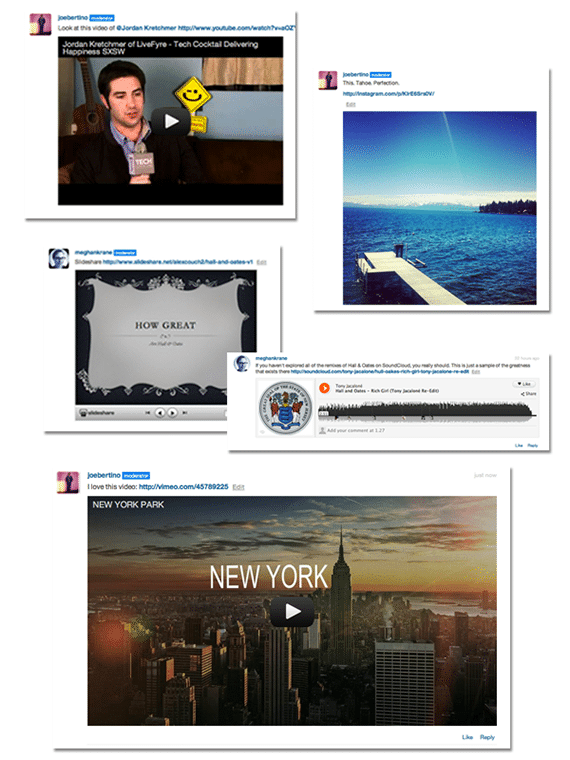
Livefyre rich media embed
Click image to enlarge

Currently supported platforms include YouTube and Vimeo (video), Flickr and Instagram (images), Slideshare (presentations), SoundCloud and Spotify (music), animated GIFs from MySpace and Wikipedia (the articles appear in-stream).

To show this media content, simply grab the URL of its parent page and drop alongside your comments, and Livefyre does the rest. It’s pretty damn cool and can make for a very entertaining comments section.

Livefyre and Multi-Site Admin

One of the new features that came out before the current beta version of Livefyre 3 was the revamped admin area for bloggers.

Livefyre Site Moderation
Click image to enlarge

Now, instead of having to hunt through reams of comments to filter one out, you can search directly by username, IP address, if it was a user logged in via Twitter or Facebook, keywords, and much more.

You can choose to do this while having all your sites open, or just one domain at a time. You can also quickly check if any comments have been filtered into pending or spam, ensuring all comments you want approved are done so.

It’s a slicker version of the previous admin area and a very welcome addition to the product.

So Is Livefyre Perfect?

Is anything? Okay, I know, glib answer and I apologize, because we all know Jessica Alba is perfect… Moving on!

As I mentioned, Livefyre 3 is currently in beta, so the version being used on blogs currently is one that will experience some hiccups as the platform moves into a wider public release.

Some of the current glitches, from my own use and conversations I’ve seen online, include:

  • The SocialSync tagging doesn’t always work the way it should, meaning you can’t tag your friends on Facebook and Twitter (by using the “@” symbol and then typing their name until it appears). For a social commenting system, this is a core part of Livefyre’s appeal.
  • Sometimes it looks like there’s no comment box, whereas it’s just Livefyre rendering. The load time has been improved from the previous Livefyre, but could sill be optimized further.
  • Styling Livefyre to suit your blog design requires CSS, and not every blogger is comfortable with this. The advantage of Disqus in this respect is it inherits the font, style and design from your blog, so should match up every time.
  • It’d be great to see your commenters’ activity across the web without having to click on their profile. A lightbox when hovering over the username would be great, and encourage commenters to visit other blogs in the Livefyre family.

In fairness, the last two are personal choices as opposed to glitches, but I feel they’d make the platform even more complete than it is currently, and its current iteration is pretty damned impressive.

So, Livefyre Is Here to Stay Then?

As I mentioned at the start of the post, if you’ve felt a little dizzy recently with the comment system changes, I apologize. But it’s the last time it should happen.

I’ve been an early supporter of Livefyre and the platform has continued to grow way beyond its potential from its early days. That continues to be the case as new features and slicker processes get added, and it’s definitely my commenting platform of choice.

Mind you, I have to take my hat off to Disqus – they’ve really upped the game with Disqus 2012, and the interface and integration is very slick. Plus, they also sent out a very fun Welcome package of Disqus goodies – thanks, guys!

But, I have to say, Livefyre just feels what a comments system should be – live, interactive, media-rich, socially-enabled and much more. Simply put, it feels like home.

And, as a blogger, that’s all I can ever ask for from a comments system. Here’s to the conversation.

Creating Your Business Playlist

Creating a business playlist

Creating a business playlist

I was going through my iPod tunes over the weekend, adding some new ones and building some new playlists.

Looking at the tracks, I saw there?s no real genre that stands out as a favourite ? there?s everything on there from hard rock to R&B, Motown to 80?s pop, classical arias to hip hop. Quite the mix.

Instead of being fractured, it makes sense for me to have so many different styles on there ? I?m sure it does for you as well.

It all depends on how the mood takes us at any given time.

For instance, if I?m driving in the summer, it?s time for hard rock, windows down, full volume. But if I?m melancholy or introspective, it?s Marvin Gaye and Ella Fitzgerald time. Different sounds for the need at any given time.

And that should apply for us in business as well.

Building a Playlist

We shouldn?t be concentrating on just one area all the time. Sure, let?s be strong where our strengths are, but does that mean we need to limit our knowledge to these strengths?

People aren?t satisfied with the one-trick pony anymore, no matter how strong or sturdy that pony might be. Agencies and organizations are having to adapt to offer an umbrella service.

PR; Marketing; Creative; Customer Service; Sales; Design ? couldn?t they be available from one source (or at least have an option to offer more than one core strength)?

Think about what you offer at the minute, and what you don?t. Can you build on that? Can you learn what you need to know, so that you can offer multiple practices instead of just one? If not, how easy can you learn? It doesn?t matter if it?s online or offline, you can find the solution:

  • Webinars
  • Forums
  • User groups
  • Networking events
  • Workshops
  • Social learning
  • In-house or on-site training

Think about what you?d like to see as a customer. Are you happy with having to go to 5-6 different agencies to get core skill sets at each one, or would you prefer a solution where everything could be under one roof? Or at least half the current amount of solutions.

Sell Your Strengths, Buy Your Weakness

Even if you don?t have the time to take onboard the new skills you need, why not outsource but keep it under your banner?

Search for freelancers that you can call on for projects that need a specific expertise. Nurture relationships, build portfolios, treat as equals ? you never know what could come from it, and it opens your own business up to many more possibilities.

Having a favourite band is normal. Having a favourite type of music is normal. But just think of the amazing sounds you could be missing out on if you don?t mix up your iPod every now and again.

Is it time for you to freshen up your business playlist?

Justin Bieber, Green Bananas and Upsetting Canada – All in 30 Minutes

Social media talks

Social media talks

It seems strange to think that?Jugnoo?s Social Mix event?was way back in July.

It still seems so fresh, and we?re continuing to get great feedback and praise today, almost two months later.

There?s no doubt it was an incredible day, with lots of lessons learned and shared.

On a personal level, I feel really fortunate to have been able to speak and share the stage with people I both admire and look up to, as well as long-time friends and peers.

So what did I talk about?

Your Business Is Not The Story

People often credit social media for making businesses realize they?re not the story ? but good business owners have known this all along.

You are not the story. You never have been. Not even in the ?bad old days? before social media were you ever the story.?But the story? That belongs to the customer. Every time.

This would ? to me ? seem obvious, and yet you see examples every day of where businesses take their customers for granted, fail to address issues and plough on the path they want, as opposed to the path their customers need.

And then they wonder why their sales are down?

Think like a customer, be the customer, and you?ll get and keep the customer.

Being Human in a Non-Human World

While the tools like Twitter, Facebook, YouTube, etc ? as well as more advanced?Social CRM platforms?? allow us to connect and engage with our customers like never before, we?re still human beings.

Automated systems and the bits and bytes that make up these social platforms are all well and good ? but it still takes the handshake (real or virtual) of human-to-human connection to solidify the relationship that leads to the sale.

People are not conducive when it comes to creating an ideal world for brands to operate in. We?re too human for start.

Instead of canned responses and sterile corporate voices, we need to bring the human aspect of our offline personas online to our business ones. After all, who ever bought from a diode?

My talk is below ? I hope you enjoy, and would love to hear your thoughts in the comments on the bigger picture the video discusses.

Cheers!

[youtube]http://www.youtube.com/watch?v=vUGH_rGC7h4[/youtube]

Related articles
  • Using Social Media to Manage Relationships Through the Sales Funnel (jugnoo.com)
  • Who Shouldn’t Worry With Social CRM (socialcrminfo.com)

The State of Social Media Marketing 2012

Social media measurement

State of Social Media Marketing 2012

Social marketing software company Awareness has just released the second part of its bi-annual State of Social Media Marketing report for 2012, and it makes for some pretty interesting reading.

Surveying 469 marketers from a variety of industries, expertise and verticals, the report looks at how businesses are using social media (or not), the key pain points, and where businesses are heading in 2013.

Some of the key findings include:

  • 44% of companies with social marketing budgets of $100,000 or more are using social CRM software, compared to 16% in general.
  • 68% are interested in expanding their social footprint.
  • 50% see the need to tighten integration between social and more traditional marketing.
  • Social marketing ROI, a larger social presence and reach, and increased content creation and publishing are three areas executives are looking to concentrate on in 2013.

What’s interesting from these points alone is that social is definitely seen as a core strategy for many businesses to take on in the next 12 months and beyond. Yet, clearly, there’s still some ambiguity around social – the ROI question continues, as does building a strong presence where results can be actionable and measured.

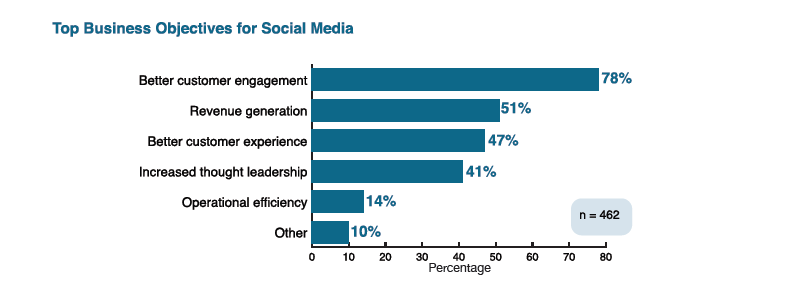
The good news is, despite the ambiguity, when you look at the top business objectives for social media it’s clear that the customer experience is key (click to expand):

Top business objectives in social media

Seeing two of the top three objectives geared towards the customer is encouraging – it would seem that brands are finally realizing the amplification social offers consumers, so they’d better improve and tailor the experience while continuing to foster the initial touch-point.

So what else does the Awareness report tell us?

Social Media is Still a Challenge

It’s sad to say, but social media continues to be a challenge for many businesses in 2012. This, despite many seeing the tipping point of social media as 2010, when the ROI question and the business benefits of social media were really taken into the mainstream.

So what are the challenges that businesses continue to face when it comes to social media?

Top social media marketing challenges

While the lead challenge is still that of ROI, what’s interesting is the percentage that are struggling to integrate with the rest of the marketing vertical.

This accounts for almost a third, and is a clear indication that businesses are finally starting to realize that social isn’t a standalone strategy, but a core part of the bigger marketing picture. While it’s a struggle at the minute, the recognition it needs to be integrated bodes well for the future of these businesses.

Social Media and Measurement

For any business, knowing how successful a campaign is – whether that’s external or internal – is key to understanding where that business needs to grow and improve, and where it’s already doing a good job.

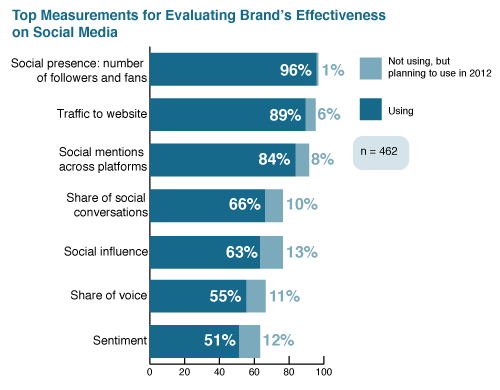
When it comes to social media, measurement is just as key – and brands are definitely keeping score when it comes to how effective their business is on social media:

Top social media measurements for brand effectiveness

What’s interesting about this particular section of the report is that almost every single respondent chose number of fans and followers as the #1 barometer of social media success.

This, despite the fact fans and followers can be bought for as little as $5 for 10,100 Twitter “followers”. While it’s great to have a large following, it’s how engaged and involved with your brand that really matters. Numbers mean squat unless they add to your business overall.

Social influence is truly becoming a mainstay of the business landscape when it comes to social media, with almost 2/3 of businesses looking to increase their influence in the space. As Kred, Klout and others look to grab this slice of the action, expect that number to rise in 2013.

Social Media and Revenue

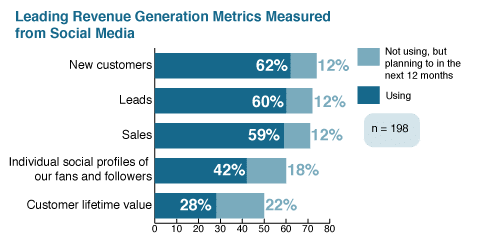
Perhaps one of the biggest questions around social media is that of revenue and lead generation. With ROI still being the leading business question around social media channels and campaigns, it’s no surprise that revenue is a core part of the equation.

What is surprising are two of the answers to the revenue question:

Social media and revenue

While the top three responses make perfect sense, the next two are a little worrying. If, as a marketer, you don’t know where your customers are online, you’re immediately at a disadvantage to your competitors who’re actively profiling their customers.

Even more concerning, perhaps, is the percentage that uses social media when it comes to the lifetime value of a customer. To these businesses, there’s a simple question in return: if you’re not using the simplest way to track a customer’s satisfaction, what exactly are you using?

By knowing your customer’s social footprint and combining that with monitoring and profiling, you can get an untainted and unbiased overview of what they think about you, your brand, your product and/or your service.

Social media continues to be the greatest focus group out there, because it’s tuning in on natural conversations – so why are just over a quarter of marketers understanding this? Scary stuff.

The Future of Social Media

As you can see, there are still some major challenges in the adoption of social media when it comes to business, regardless of size and resources.

As well as the points above, other challenges include tracking multiple channels, choosing the right tools, delegating the right people and tying social media results to actual business results.

The social CRM issue continues to be one that’s lacking in uptake, with only 16% of businesses currently using a social CRM system. While 21% are planning to, 17% don’t know what a social CRM system is and why businesses need it.

It’s perhaps this last stat that’s the most concerning since, without a CRM platform in place, how do you expect to truly measure activity and results, and allocate the right resources and team members, to ensure the customer experience is everything it can be?

The good news is, companies are beginning to notice where they’re lacking and what needs to be done to improve:

  • 53% of businesses are now using more than two Facebook accounts, to offer a more targeted experience (13% have more than five profiles).
  • 45% of businesses have two or more Twitter accounts, with 11% having more than five profiles.
  • 80% of marketers are creating teams of up to three people to manage social media.
  • 65% are using community platforms to engage with their customer base, while collaboration platforms like Basecamp and Huddle are expected to be used more in 2013.

There’s no doubt that social media is here to stay. Consumers continue to be the driving force behind its growth and businesses are clearly realizing they need to catch up.

The State of Social Media Marketing report offers hope that they’re doing just that.

To receive the full State of Social Media Marketing 2012 report, click here.

Related articles
  • Is Social Media a Waste of Time? (dannybrown.me)
  • How Much Listening Does Social Media Listening Really Offer? (dannybrown.me)
  • A Special @JugnooMe Invite to @Seesmic Users #Seesmic (dannybrown.me)

A Special @JugnooMe Invite to @Seesmic Users #Seesmic

Jugnoo social crm

Jugnoo social crm

Dear Seesmic User,

As the news of Seesmic being acquired by Hootsuite settles and you look to decide what you wish to do next, we’d love to offer you another option to moving to Seesmic’s new home.

As someone who used Seesmic back when it was a simple video-sharing tool, and seeing how it progressed to a full social dashboard, it was kinda bittersweet to see it lose its independence.

Ryan Holmes, the CEO of Hootsuite, has already stated:

If someone is a casual user of Seesmic, go this way [e.g. to Twitter]. We’ve always been very focused on the Enterprise.

While this is great for Enterprise-level users, it’s probably not so great for solo entrepreneurs, smaller or mid-sized businesses, or even casual users of Seesmic.

This is where Jugnoo would like to help and offer another option for you.

More Than Just a Social Dashboard

As a Seesmic user, you already know how to manage your social accounts across multiple networks, as well as uploading rich media and creating search streams, etc.

However, social media – whether you’re a casual user or a business user – is much more than just being able to have multiple streams and team members.

You also need context of your social media activity; your most influential conversations; multimedia promotional tools; analytics and much, much more. This is where Jugnoo and our Social CRM solution takes your Seesmic experience to the next level.

Here are just some features, some you’ll already know, others you’ll want to know:

Social Dashboard

Jugnoo social dashboard
The Jugnoo social dashboard (click to expand)

Much like Seesmic, the Jugnoo social dashboard allows you to consolidate several social accounts under the one roof.

Currently supported platforms include Twitter, Facebook (Profiles and Pages), LinkedIn, YouTube, Buffer, Posterous, Tumblr and Google, with more being added regularly.

This allows you to post updates to more than one network, and our Buffer partnership ensures you can schedule these updates at a time when the majority of your audience is online.

Multiple Search Streams

Jugnoo saved searches
Multiple saved search streams (click to expand)

As well as being able to update your networks, you can also set up various streams just for search purposes. This is perfect for brand monitoring; customer service; keywords; reputation management; competitive analysis; and much, much more.

You can then just choose which streams you have open in your browser, and our responsive design ensures the optimum amount of information is on display at any given time.

Oh, and if you’re a regular Twitter chat attendee, and use a stream dedicated to the hashtag, we automagically populate your tweet with the chat hashtag when you reply to someone – bonus!

Social Monitoring

Jugnoo social monitoring
Jugnoo social monitoring (click to expand)

While being able to manage multiple accounts is all well and good, if you’re not measuring then you’re not using social media to the full potential for your business.

With Jugnoo’s social monitoring solution, we help you understand the impact of your online actions. Who’s talking about you; where are they; who are they; how are they describing you; and more.

Better still, not only does our social monitoring show you at a glance how your business is doing on social media, we also have the tools that partner with monitoring seamlessly to take your understanding of your audience to the next level.

Social Analytics

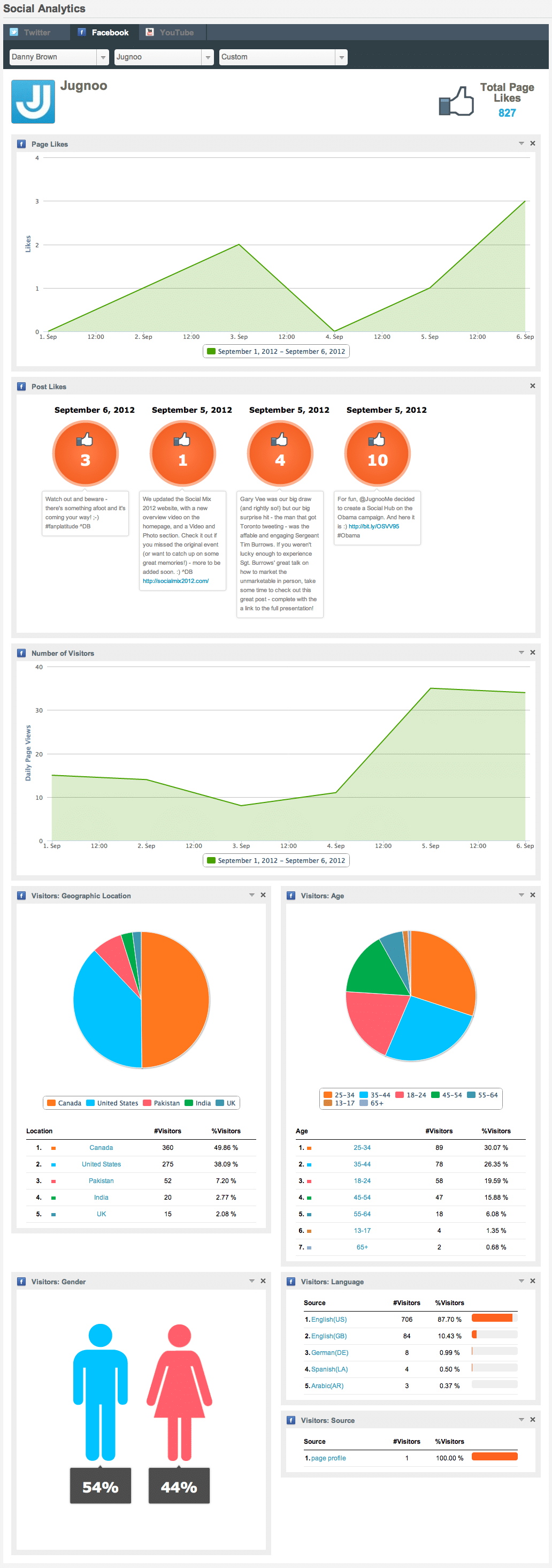
Facebook analytics
Facebook analytics (click to expand)

Understanding your followers and fans is key to helping you create the kind of content they want to consume. Create that kind of content, and the likelihood of your audience sharing your product or service increases, and this then helps you improve your offering as feedback comes in.

With Jugnoo’s social analytics, you can begin to learn more about your Facebook, Twitter and YouTube audience.

While the information primarily looks at peg counts, reach and views in the current version, our imminent update will dive deeper into the make-up of your audience, including purchase intent history and more.

Tweet Visualyzer?

Jugnoo Buzz Visualized
Jugnoo Buzz Visualized (click to expand)

Currently for Twitter only, but with more platforms to be added soon, Jugnoo’s Tweet Visualyzer? takes your monitoring and keyword searches to a visually attractive and easy-to-manage playground.

Not only does the Tweet Visualyzer? show you who’s saying what and when they’re saying it, it groups conversations and participants of these conversations together based on the context of the conversation itself.

What does this mean for your business? Simple – now you can truly see who drives the most buzz around your business, enabling you to initiate contact with them on a possible ambassador program, where they become your voice to their audience.

It’s taking social influence to its natural next stage.

Social Hub

Jugnoo Social Hub Lennox Lewis
Jugnoo Social Hub Lennox Lewis (click to expand)

The great thing about the social web is there’s so much choice for the consumer. The bad thing about the social web is there’s so much choice for the consumer – at least, as far as trying to keep their attention on your core products and services.

While some social users may prefer twitter, others love Facebook, while others look to blogs for recommendations, purchases, etc. This is where Jugnoo’s Social Hub comes in.

For brands, you can collate all your main social feeds and rich media – Twitter, Facebook, YouTube, RSS, Pinterest and Instagram, etc – and display them on a hub that’s the equivalent of Pinterest on steroids.

Visitors can then browse, share, save and recommend. Not only that, with Social Hub 2.0 due imminently, you’ll be able to offer e-commerce solutions directly from the hub – if your visitor sees something they like, they can buy it there and then.

For consumers, they can collate their favourite brands into one area and only receive the offers they’re interested in, increasing the likelihood of a sale from the hub.

It’s a win-win all round.

Social Teams

Jugnoo social teams
Jugnoo social teams (click to expand)

For most businesses, it’s no longer just a one-man job when it comes to your social media strategy and community management.

Instead, it’s more likely to be social teams that run a campaign and account – sales, marketing, customer service, community management, content curators and more.

This is where the Jugnoo social teams solution helps. You can allocate team members to different teams; define user roles (from full admin to content sharer only and everything in-between); choose which social networks are used in the team; and more.

Add in our Workflow solution – released next month – and you have a fully-fledged social workroom with tasks, reports and more across your business.

Video Marketing

People, by nature, are visual creatures, and it’s why images and videos are the most popular items when it comes to sharing across social networks. With that in mind, enter Jugnoo’s Social Video Marketing suite.

With our video marketing software, you can both create and distribute powerful marketing messages to your audience. Or educational videos. Or fun videos – the choices are only limited by your needs.

We provide you with a library of templates, with more added regularly, as well as images and soundtracks to use in your videos.

You can also upload your own, and the editing suite allows you to crop, cut, focus and much more to create a truly engaging and professionally-edited video.

It’s no surprise that this is one of the most popular features of Jugnoo’s userbase.

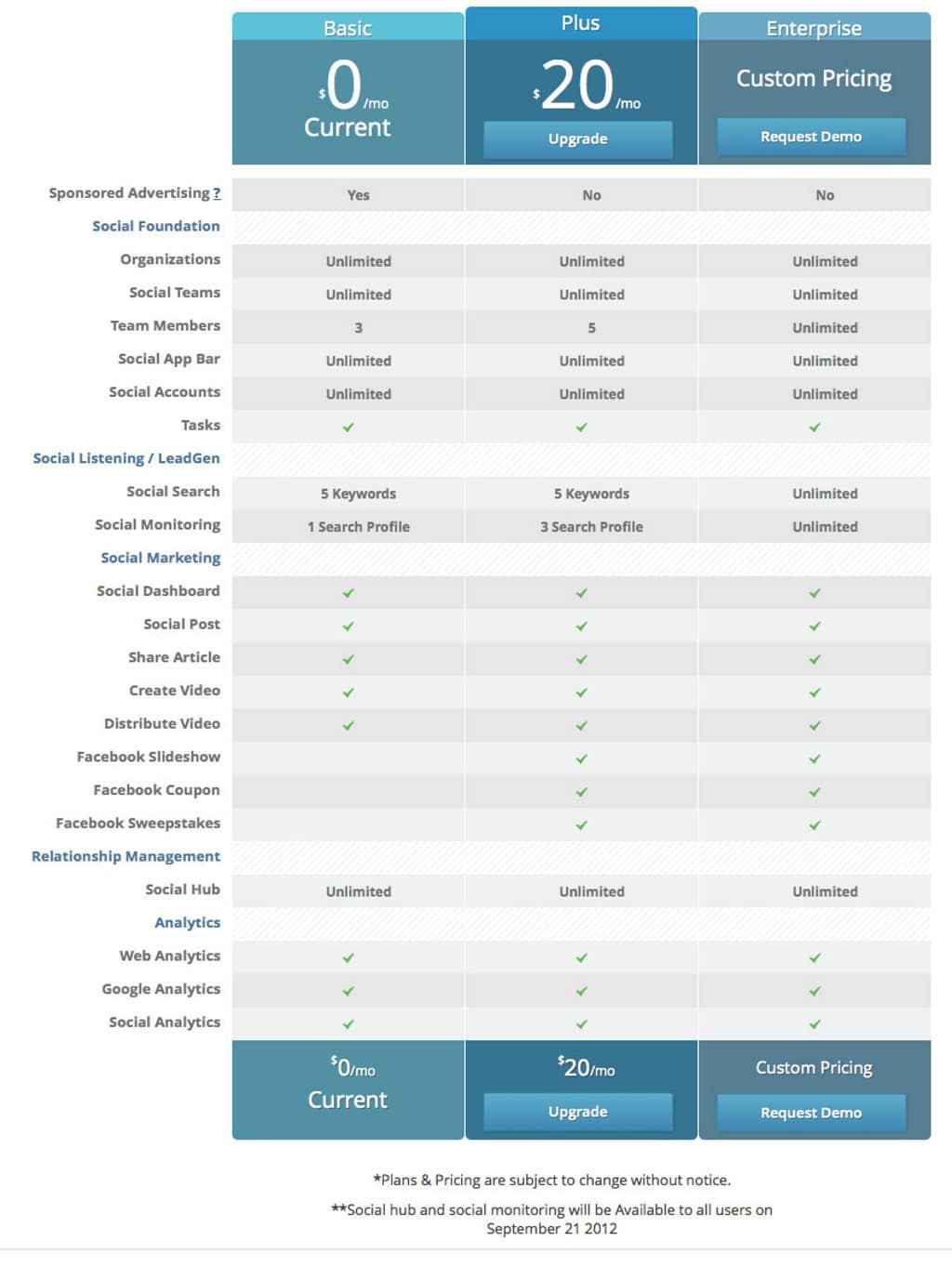
How Does $20 per Month Sound For All This and More?

As you can see, Jugnoo offers a host of features and solutions that take it beyond being “just a social media dashboard.” As Jure Klepic of The Huffington Post writes:

Jugnoo is far more powerful than Hootsuite.

As kind as Jure’s words are, we’re not resting on our laurels. While the features here are in-depth and cohesive, they’re just part of the bigger picture.

Coming in the next couple of weeks you’ll see more social networks, RSS feeds, customs streams (multiple networks in a single stream) and more. There’s also our lead generation solution that will identify and delegate sales opportunities based on language, keywords and sentiment tracking.

Add to that our mobile app – release date the next eight weeks – and, as you can see, it’s quite the package – and one you can have it all for just $20 per month.

Yes, you read that correctly:

$20 per month for all the above features and the upcoming ones.

This is to both celebrate us coming out of our beta mode in October, and to show that – as a loyal Seesmic user – you don’t have to be limited to either moving to a new owner or using the basic Twitter and Facebook features.

Not only that, but when you transfer from Seesmic to Jugnoo, we’ll lock you in at our special $20 per month offer for life, even when we add new features and solutions.

As a quick comparison, Jugnoo offers 5 team members for $20 per month. To get the same team numbers on Hootsuite, you’d have to pay $50 per month:

Hootsuite pricing plans
Hootsuite pricing plans (click to enlarge)

We know how much you need a social dashboard – but we also know that you need more than that to truly be effective with your time and success.

We’re sorry to see Seesmic disappear, too – as fans of both the product and of Loic and his team. With this offer, we’d like to try and make your next decision a little less hard.

If you’re ready to check us out free for 30 days, click here or on the Pricing Plan details below to get started.

We look forward to giving you a warm welcome aboard the Jugnoo experience.

Note – Social Teams will be available on September 14. Social Monitoring and Social Hub will be available to all users on September 21.

Jugnoo pricing plan

  • « Go to Previous Page
  • Page 1
  • Page 2
  • Page 3
  • Go to Next Page »
© 2026 Danny Brown - Made with ♥ on Genesis