• Skip to primary navigation
  • Skip to main content
Danny Brown

Danny Brown

podcaster - author - creator

  • About
  • Podcasts
  • Journal

Blog Tips

Everything Around You is an Idea

A little while back, my wife was talking to me about her blog. She?s an independent author and, as such, uses her blog a lot to talk about her books, her characters, events, etc.

One of the things she said was she found it hard to come up with ideas, given that there?s only so much you can talk about plot and print.

I asked her if she?d ever considered being more personal. Let readers get to know the real person behind the author.

What inspires her; what she?s afraid of; what her goals are beyond sales and recognition.

As a result, she started to publish more personal posts, with one, in particular, getting over 700 shares on Facebook and more than 30 comments.

From my own experience, even though I stopped writing directly about business on my blog in 2014, I still get business inquiries, along with emails and comments on how certain posts aren?t restricted to the personal topic I?ve written about.

Which makes sense ? because our whole lives are one big blog post idea.

  • The beauty of the sunset, and how that can inspire a new beginning in business when the next dawn rises;
  • The innocence of children, and how that can make us better business leaders without ego or ignorance fuelling us;
  • The friendly neighbour who?ll do anything for another human, and how that can make us more accountable as colleagues;
  • The love of our pets, and how that can instill the importance of loyalty and reward when it comes to our customers.

These are just some ways that everyday occurrences can result in a business lesson. Which can then be turned into a piece of content.

Because if there?s one thing I?ve found to be true, both in business and in life, it?s this ? people relate to real life.

If your people (your customers, your colleagues, your clients, your readers) can relate to your life and all you learn from it, it?s pretty much a guarantee that the goals you have will be easier to meet.

Try it ? you might just find out it?s all you needed to do to begin with.

More Blog Subscribers and Comments? Better Use Postmatic!

Original

Ask any blogger what their two main wishes are for their blogs, and eight times out of ten* you’ll probably get “more comments” and “more subscribers” as the answer.

*Note – eight times out of ten is not a scientific discovery, although it may be.

Especially for bloggers who thrive on engagement, more comments means more goals met. More comments also have a way of increasing subscribers, because if a reader leaves a comment, it means they’ve enjoyed the piece. If they’ve enjoyed the piece, it stands to reason that they’d want to subscribe to get more of the same content.

So, yeah: comments and subscribers.

The problem is, in recent years, many bloggers have complained (some rightly, some not so much) that blog comments have started to dwindle, as more readers took their discussions to other platforms, more often than not Facebook and Google+.

To counter that, third party comment plugins like Livefyre and Disqus offered workarounds – Livefyre’s SocialSync feature pulled in tweets and Facebook comments, while Disqus allowed you to tag Twitter users.

Then there was Comments Evolved, that allowed you to display comments from Livefyre, Disqus, Facebook, Google+, alongside your native WordPress comments. Unfortunately, while that plugin was useful, it stopped being supported.

However, much like many third party plugins (especially ones that have social network support built in), performance of a blog could be impacted, as Twitter and Facebook API calls slowed down response times.

Add to that the recent announcement by both Livefyre and Disqus that sponsored comments and ads would be appearing alongside “normal comments”, and the negativity these announcements received, the need for a solid native WordPress comment solution continued.

Until Postmatic came along, that is.

Postmatic? What’s That, Then?

While many other plugins offer a “unique” spin on how they approach blog comments, Postmatic actually delivers on that promise.

Postmatic free

Instead of having to comment via the web (although that’s still possible – more on that later), Postmatic allows you to get a new post by email, read it, and then comment on that post just by hitting reply to the email you’ve just read.

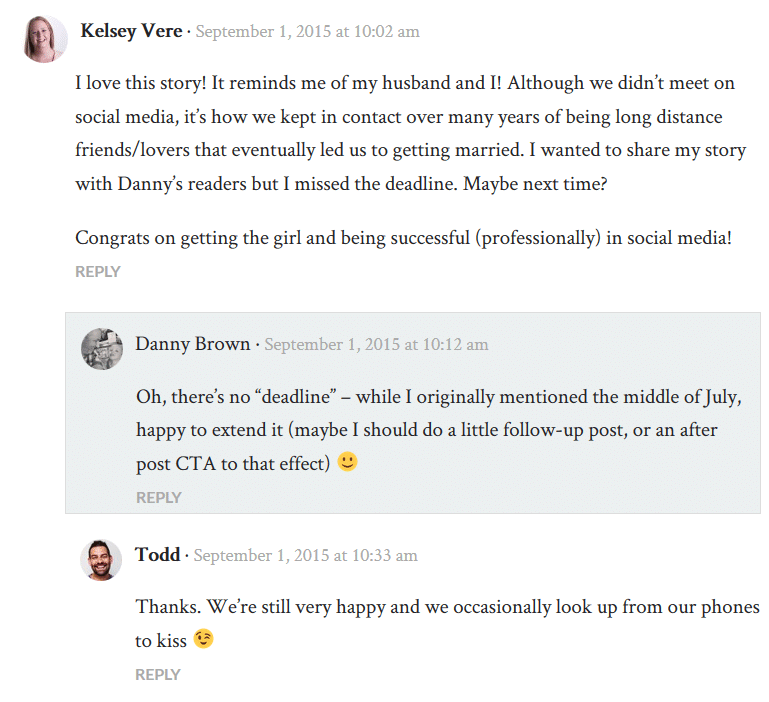
If you want to try it for yourself, simply leave a comment below this post and see what happens when other comments come in!

It’s so simple, you wonder why no-one has really thought of this sooner (there was a stripped down version of this for Disqus, but it was only for admins).

As well as being simple, it makes perfect sense.

Think about it – where do you spend most of your time during the day? A good bet would say email (perhaps second only to Clash of Clans) – so if you’re spending so much time in email, why wouldn’t you manage all your blog post interactions that way too?

In Postmatic?s own words,

We raise engagement by reaching your audience where they are – in their inbox. Except now with Postmatic, they can comment back and keep the conversation going just by hitting reply.

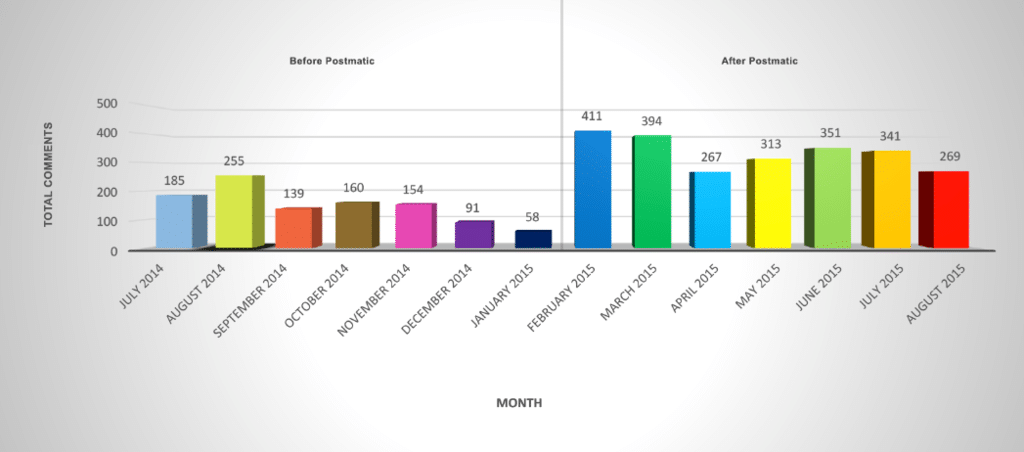
As a user of Postmatic since February this year, I can 100% agree that engagement levels have increased, as shown by the chart below.

Danny Brown Postmatic stats

As you can see, in the seven months prior to installing Postmatic, my comment count per month averaged 149 comments per month. In the seven months since implementing Postmatic, that jumps to 312.

That’s more than doubled my average comment count!

My posting schedule over these 14 months has remained pretty consistent (with the exception of one post per month more in May, June and July this year), as did my social shares – so how come Postmatic grew my comments and engagement when other plugins didn’t?

Simple – people felt comfortable commenting on my blog, because there were no extra hoops like social log ins, account creations, passwords, etc., to jump through.

Additionally, because Postmatic enables commenting by email, people could truly post a comment or reply whenever they wanted – at their desk, at the supermarket, at work, even while lazing at the beach having a cold drink (as I did, numerous times, over the summer).

However, as much as Postmatic raises engagement, there’s so much more to them than that.

Grow, Deliver, Engage, Value

Postmatic’s goal is simple – to reward bloggers for the love, sweat, time and money they put into their content.

To that end, they’ve created a four pronged approach so bloggers can focus on the specific area(s) they want to improve. While each area can work individually, it’s when you combine them that the magic truly happens.

1. Grow

It’s not just engagement that Postmatic grows. Pretty much every blogger also wants to grow their subscriber numbers, whether that’s via RSS subscribers or – more usually – email subscribers, and Postmatic delivers here too.

While there are a bunch of plugins like Optin Monster and Bloom that can help grow your email subscribers already, Postmatic offers a free alternative called, simply enough, Postmatic Optins.

While not as feature-intense as similar plugins, Postmatic Optins offers four flavours of optin forms: Popup over the page, Slider, Top Bar, and After Content.

Between them, these four options cover the most popular optin forms for email lists (with the exception of Exit Intent, which is scheduled for a future update).

As you can see, they don’t look too shabby either.

After content and slider

Each optin has five basic colour options, to help blend into your theme design better (you can also edit them via CSS). Additionally, the copy is fully customizable and supports HTML, so you can create very customized forms specific to your email list goals.

Not only that, but for the pop up and slider optins, you can choose when these display – after a set amount of time, after the reader scrolls to the end of a post, or after they leave a comment.

While there are only four optins at the moment, they more than cover the needs for the majority of bloggers looking to grow email subscription numbers.

In addition to the Optins, Postmatic also has a pretty cool Import and Invite set-up. The import option allows you to import subscribers from MailChimp, Mailpoet, Jetpack, and Subscribe to Comments Reloaded.

With the invite option, you can invite past commenters, commenters who are subscribed to replies but not posts, email lists and more (Postmatic do a great job of ensuring bloggers don’t abuse this option with clear wording around best practices).

2. Deliver

Not only does Postmatic help you grow your subscribers, it also delivers your posts directly to them.

Much like Feedblitz, Feedburner, and Mailpoet’s email delivery service, Postmatic sends out each new post by email to your subscribers. The free version of Postmatic sends the post via the mail service of your web host, while Postmatic Premium uses Mandrill and/or Mailgun, depending on network traffic.

While the free version of Postmatic is more than adequate for email delivery of your posts, it’s when you make the jump to premium that the service really shines.

Postmatic pricing comparison

As well as guaranteeing delivery of your email, the extra features and options available to premium users makes the current $9 per month per site a steal.

  • The ability to customize the header and footer of your email, using either images or widgets (Postmatic adds email widgets to your standard WordPress widgets).
  • The option to differentiate widgets depending on whether the email is a new post delivery, or a comment reply email.
  • Support for other third-party plugins, like Social Warfare sharing, and Skimlinks affiliate links (more on that later).
  • The ability to spam, trash or approve a moderated comment, all from your email.

However, in addition to the features above, and the comparisons in the image above, the key difference between the free and premium version of Postmatic is how the posts are delivered.

If you’re used to receiving posts from Jetpack or Subscribe2, you’ll know the basic look and feel of these emails. Nothing particularly wrong with them – just that they lack the bells and whistles of other email services (branding, images, etc). This is the same for the free version of Postmatic.

Postmatic Premium, on the other hand, converts your post, with all its formatting, to email-compatible HTML and wraps it in the customized template you’ve created with your own images and widget areas.

Postmatic premium

The result is a beautiful, uncluttered, content-focused email template ? with the added bonus that your subscribers can leave a comment (and reply to future ones) all from the comfort of that very same email!

3. Engage

As I mentioned earlier in the post, one of Postmatic’s main goals is to grow the engagement around a blog post. As highlighted by the chart showing my own blog’s engagement growth, this is a goal Postmatic are more than delivering on.

Other bloggers that have switched to Postmatic have also shared how it’s helped their own blogs when it comes to comments and engagement.

However, the mindset to comment via email can still be a big one to overcome – after all, we’ve commented via the web for so long, it’s become the only way we know.

While Postmatic quickly becomes second nature once you’ve actually used it, the team behind the plugin also recognize that some commenters will still prefer web commenting, which is why they’ve released Epoch.

Epoch

Pronounced “epic”, Epoch can best be described as a comment plugin that offers the best features of Disqus – real-time commenting, Ajax loading – while solving some major long-time complaints about native WordPress comments, like page cache support and CDN support, all while remaining SEO-friendly.

Because of the light design of the plugin, it doesn’t eat up resources the same way a Disqus would. Nor should you have any loading issues when trying to post a comment – anyone whose ever seen the little spinning circle of Disqus loading doom will appreciate Epoch’s approach here, especially on mobile.

Since Epoch supports Ajax commenting, every comment left on a post via the web will appear immediately, with no reloading of the page. You can see Epoch in action on this blog – just leave a comment if you’re reading this on the web.

While Epoch is a standalone plugin and can be used on any self-hosted WordPress blog, combining it with Postmatic sees some pretty cool stuff happening.

No matter if you’re commenting on the web, or from your email, every comment is updated in real-time. So, a web user could be leaving a comment, and a new one from an email subscriber could appear on the post – all without disrupting the web commenter.

Oh, and remember the Postmatic Optin option of the Slider or Popup only appearing after a comment has been left? If the blogger has Epoch activated, it will fill out the name and email part of the form, and the reader only has to click the subscribe button – how’s that for frictionless subscriber growth?

Epoch has three style settings when it comes to the look and feel of the comments on your site.

To help you choose which one is best for you, the plugin’s settings asks how much you’d like Epoch to take over that look and feel – “Completely”, “Use my typography and colours”, and “Minimally”.

  • Completely is Epoch’s own styling, and is the one that most resembles your typical third-party comments style like Disqus.
  • Use my own typography and colours is the best of both worlds, inasmuch that your own font and link colours will be used, while the style of the copy will closely resemble your existing comments.
  • Minimally simply gives you all the features of Epoch, while using your existing comment style. However, there may be some glitches based on your theme’s code, so this option may or may not work for you.
Epoch use my typo

My own preference is for using my own typography, as per the image above, but I also use the Completely option on other sites, and it’s an excellent alternative for anyone that prefers the Disqus approach to styling.

Epoch Completely style

Epoch recently came out of beta, but already it’s shaping up to be an excellent commenting option, and one that promises to make blog comments more fun and less complicated again – which is no bad thing at all.

4. Value

The last part of Postmatic’s four tiered approach to helping bloggers meet their goals is the question of value.

When you think of the word value, and its use around a blog, what do you think of?

  • Monetizing a blog?
  • The value a blogger brings to his or her readers, commenters and subscribers?
  • The value of a blogger to brands?
  • Sponsorship opportunities?

All of these, and more, are actually the definition of value when it comes to a blog. Think about it – you read/subscribe to a blog because of the value in the content, and the expertise that blogger brings.

You’re also happy to support that blogger through affiliate links, because of the value the blogger brings in recommending only products that would be valuable to you.

As a blogger, you might feel that the readership and engaged community you have built trust with is an ideal one to help you become a trusted partner for brands looking to do right by their customers.

All of these goals can be met by Postmatic.

  • A blogger grows their list, helping to add to their value to a brand or affiliates/sponsors.
  • A commenter grows their circle of connections, and feels their thoughts are valued more.
  • A blogger thinking of a community membership site can use Postmatic to deliver exclusive, behind-the-paywall conversations and value all from email.
  • Because of the approach to privacy Postmatic takes, commenters and subscribers can be more confident that they won’t be spammed, nor will their information be used for third parties and retargeting, making the relationship between blogger and subscriber more valuable.

These are just some of the ways value can be built via Postmatic.

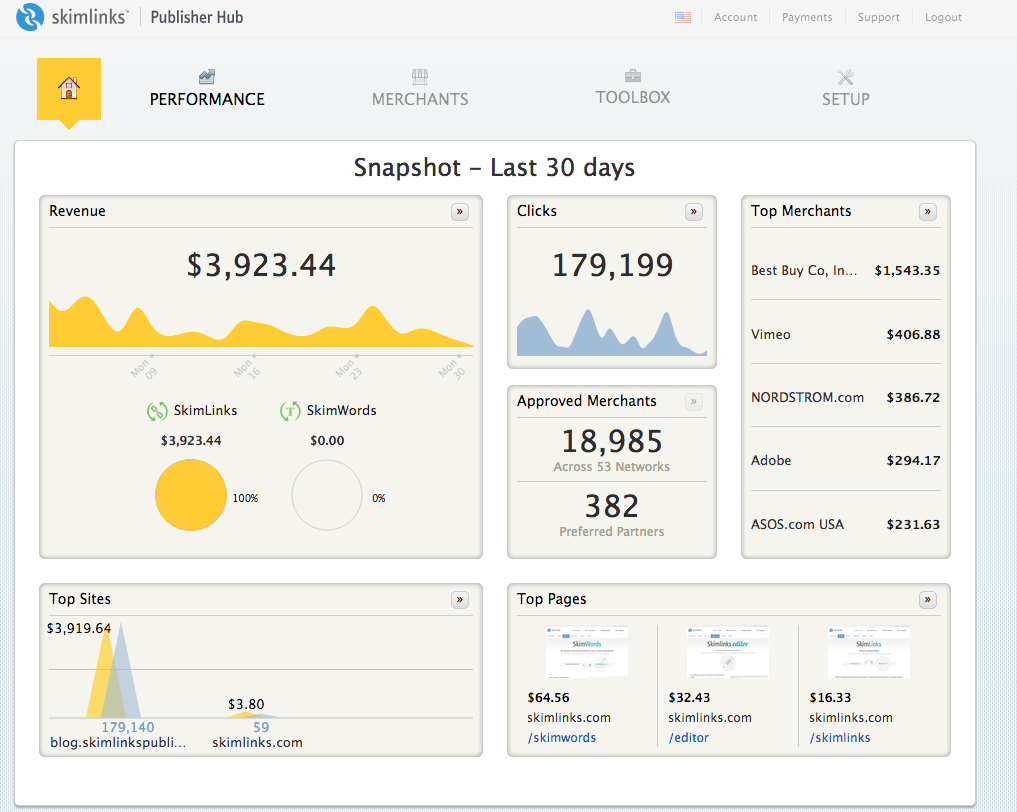
Additionally, they recently announced the support for Skimlinks in Postmatic emails.

skimlinks

Skimlinks is a pretty slick way of working with affiliate links.

  1. If you think Skimlinks is a good fit for your content you sign up on their site.
  2. Install a javascript snippet on your blog (or use their WordPress plugin) and you’re done.
  3. The next time you write about a product or service that has any sort of affiliate program, Skimlinks will intercept any clicks on links in your post, track the sales, and share the commission with you.

Skimlinks work from within Postmatic emails so tracking affiliate sales happens both on the web and in the inbox.

Now when you send an email out, the Skimlinks aren’t just restricted to your website. Couple this with some other vendors Postmatic are hoping to announce soon, and you should be starting to see why Postmatic is a developer to sit up and take notice of.

So, Should YOU Use Postmatic?

Uh, why have you read this far is you’re not interested?? 😉

Seriously, though, I can’t recommend Postmatic enough. I’ve tried pretty much every comment system around – Livefyre, Disqus, wpDiscuz, G+, Jetpack, Echo, IntenseDebate, etc., and Postmatic beats them all hands down (especially now they have Epoch).

Their Optins make it easy to grow subscribers, without the extra cost of other, more popular plugins.

Their support is second-to-none (seriously), and their willingness to listen to their users (and the readers of their users), to add new features and support for other plugins, is something all WordPress developers should take notes from.

Are they perfect? Not quite (but they’re close).

  • You won’t currently get analytics around your emails, but then Postmatic isn’t (currently) meant to replace a Mailchimp or AWeber. Instead, it’s about raising engagement, all while delivering beautiful emails that allow comments to start the moment a post is received.
  • The Optins don’t have analytics like Bloom does – but then, Bloom is premium and their analytics are fairly basic. Besides, it’s easy enough to use Google Analytics to set up tracking subscription statistics.
  • There’s also no weekly digest of emails – yet. However, if that’s something that you prefer over instant delivery of posts, look out for digests in the next major update of the plugin.

Postmatic keeps the features focused and the experience tight, with a major focus on getting people talking about your content, which means they don’t charge hundreds of dollars for the service like others do.

While the free version is fine, ask yourself this – if you could meet your goals as a blogger when it comes to subscribers, comments, brand partnerships, affiliate sales, membership site opportunities and more, would you be willing to spend just $9 per month for that?

I know I would. And did. And I haven’t looked back since.

A version of this post originally appeared on WPKUBE.

Should You Care About Losing Blog Subscribers?

Your story

Yes. No. Maybe. It depends. I know ? crappy answer, right? But each one can be applied to the question of losing blog subscribers and if you should care or not.

After all, as bloggers, we?re more often than not told that ?it?s all about the list?. This usually refers to an email list, and why building one is important for your blog?s growth.

I?m not going to get into the ?do I need a list or not?? question – there are plenty of other blog posts dedicated to that topic already.

No, for this post, I?m going to assume you already have a list. Additionally, I?m going to talk about subscribers to your blog, as opposed to subscribers to your newsletter, as there is a difference and for many bloggers, their blog subscription list is the only one they?ll have.

So, with that in mind ? should you care about losing blog subscribers? Let?s dig in.

Yes ? Your Subscribers Are Everything

When you start blogging, you might have many goals. Some of them could be to make money; some could be to share your thoughts with others; and some could be just to have a platform to get your writing mojo on.

Either way, to succeed in any of these goals (with perhaps the exception of the last one), you need readers. And, if you get readers, you want them to turn into subscribers.

[clickToTweet tweet=”Anyone can click a link on Facebook or Twitter. But it takes commitment to subscribe. #blogging” quote=”Anyone can click a link on Facebook or Twitter. But it takes commitment to subscribe.”]

After all, anyone can click a link on Facebook or Twitter and come over to read your stuff. But it takes commitment from a reader to want to follow your content religiously enough to actually subscribe. They?re saying they prefer you over the millions of other bloggers out there.

Because of that, you should care on losing them, and take steps to find out why they left.

  • Look at the content you wrote just prior to them unsubscribing and see if it?s a valid reason (perhaps a different tone or style from your normal stuff).
  • Email them and thank them for subscribing up until then, and ask if they?d mind sharing why they left.
  • If you are changing the style of your blog, and you see subscribers leaving, create a poll and ask readers their thoughts on the new direction.

By being pro-active on understanding the reasons for the unsubscribes, you can take the action needed to halt the slide.

No ? It?s Your Blog and People Don?t Need to Read What They Don?t Like

The best bloggers (at least for me) are the ones that polarize opinion and question everything. Of course, that doesn?t mean you need to be an asshat in all your posts ? just don?t follow the herd when it comes to your opinion.

For example, if you?re blogging about blog tips, try and steer away from making every post a list one about the Top 10 this or a Best 20 that. Sure, list posts are great traffic generators and, when done well, can offer a great resource. But often they can be overdone and offer little.

Instead, share your lessons and how the most unlikeliest of sources can teach you about blogging.

https://bobwp.com/teaching-pigs-to-swim-the-rise-of-the-emotionally-intelligent-blogger/

Or, if you write about social media, ignore the standard ?Why Google+ is great for business? posts and offer a rebuff on why the platform is struggling to be relevant for the majority of businesses out there.

By offering your stance on popular topics, especially if the stance goes against the popular grain, it helps you stand out as someone to listen to, since you clearly don?t buy into the hype of the Johnny Popularity bloggers.

Of course, the ?problem? with this is that people don?t like to hear they may be wrong, or the platform they put the most love into isn?t as great as they want it to be. This is where you often lose blog subscribers ? but that?s okay.

When you lose subscribers like this, it?s for a clear reason ? you believe one thing and they believe another. Sure, you could try and persuade each other the merits of each other?s point of view and, sometimes, this works.

But, for the most part, people can be stubborn ? and no-one benefits from a protracted discussion that clearly isn?t going to be resolved.

So, let your subscriber go. He or she clearly won?t enjoy your content if it?s against their beliefs; and you?re not going to enjoy the constant jibing from them because you don?t see eye-to-eye.

Let them find a blog that?s more suited to their stance, and leave you to write for the readers that actually want to be on your blog, because these are the ones that will be your biggest ambassadors as you grow your blog.

Your Turn

Of course, like any opinion piece, there?s no right answer. Well, except mine? Joke!

But the question of blog lists and subscribers is a big one, and one that has no definite right answer. After all, we all have separate goals on what we want to achieve with our blogs.

So, how about you? Do you bite your nails each time you see an unsubscribe and wonder what you did wrong? Or do you shrug, smile, and carry on as normal?

Share your own thoughts and experiences below – I’d love to hear your take.

What Turns a Blog Reader Into a Blog Subscriber?

Social media speakers

There are many success metrics when it comes to blogging – number of comments, social shares, visitors, etc.

Yet one that comes at the top of most blogger’s lists is subscribers – not just the amount of subscribers, but actually turning readers and visitors into subscribers.

After all, anyone can read or share or comment on a post. Subscribing, though, is another level of commitment by a reader, and validation for a blogger that their content is meaningful.

But what turns a blog reader into a blog subscriber? Instead of offering my own take, I decided to open up the question amongst my Facebook friends, to see what the tipping point was for them.

Given they have multiple tastes and preferences when it comes to content, I thought it’d be interesting to see what the collective reasoning was, as well as individual reasoning.

Their answers are below.

The Value Proposition

Everyone talks about blogs and bloggers needing to offer value. Yet value is defined in different ways – what may be valuable to me may be the biggest waste of time for you.

That being said, a blog’s value remains key in turning readers into subscribers.

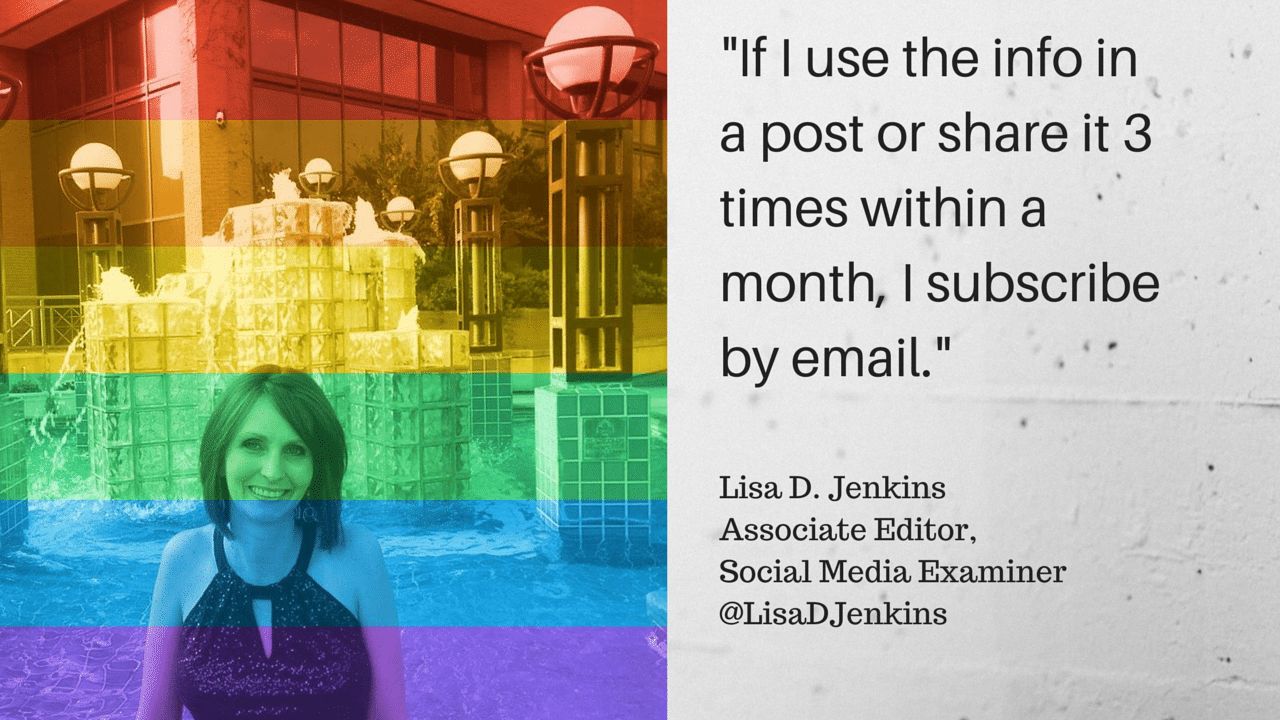
Lisa D Jenkins quote

Kelsey Vere quote

Frank Strong quote

Three different people, but the definition of value remains the same – the info shared within the content needs to instill action, and be consistent in that action.

The Relationship Proposition

As someone whose moved more into personal blogging over business blogging (though I will still tie the two together), I often talk about how the relationship between blogger and reader is key for that type of content.

Yet relationships are so much more than like and/or love. They’re intrinsic to making the switch from reader to subscriber.

Amy Tobin quote

Nancy Davis quote

Paula Kiger quote

In the past, I’ve spoken about the “relationship to the sale” – it’s clear if you want to “sell” your content to a subscriber, the relationship with that content is core when it comes to a reader jumping into the subscriber boat.

The Voice Proposition

We’ve all heard it – “you need to find your voice”, “your voice matters”, “why you need to have a strong blogging voice”, etc. We hear it so much, the importance of what exactly your blog voice is, and why it matters, is lost.

But if you want more subscribers, having a voice is essential.

Janet Fouts quote

Brian Meeks quote

Liz Scherer quoteWhether it’s the way the blogger “speaks” to us, or the way they describe something in a way no-one else really does, that “voice” is an important piece of the reader-to-subscriber puzzle.

The Variables Proposition

Of course, if it were as easy as getting three things “right”, we’d all have tens of thousands (if not hundreds of thousands) of subscribers, whether by email or RSS, right?

But there will always be the variables – the subscribers who decided to make the jump after finding something to their liking that others may not have considered.

While not as clear-cut as style, originality and voice and how they sway a subscriber’s decision, these variables still play an important role in making a reader a subscriber.

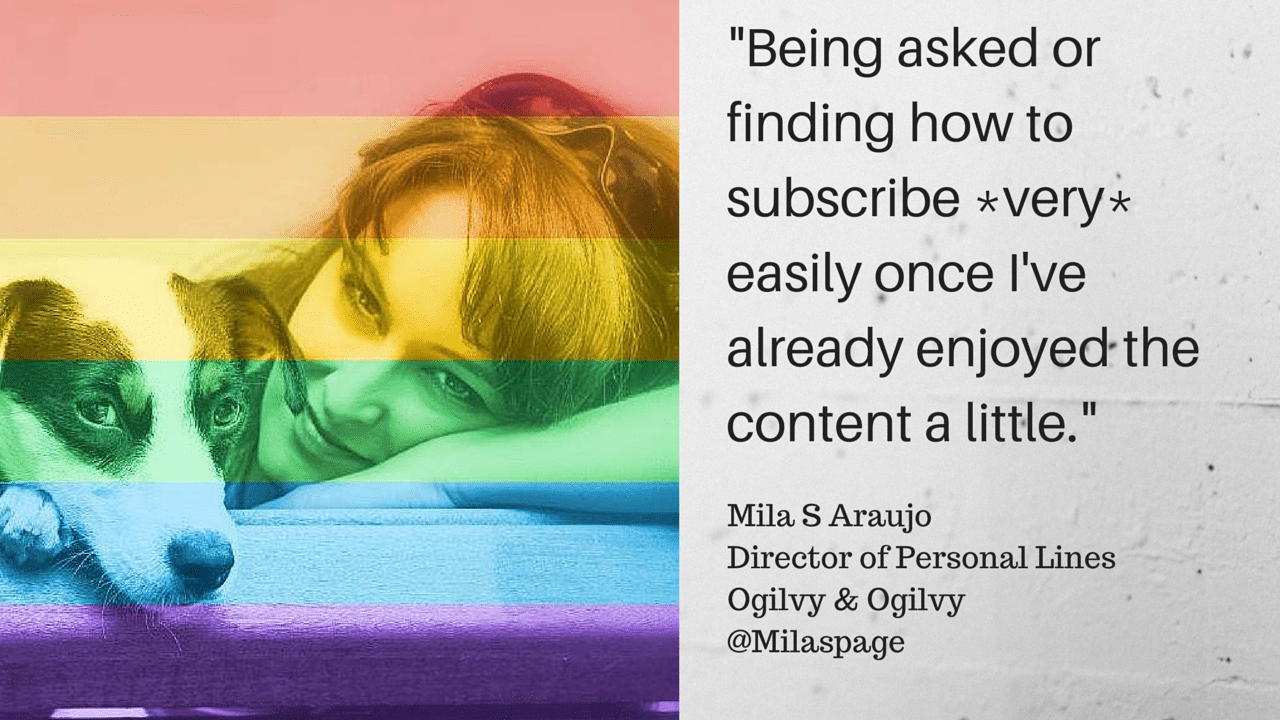
Mila Araujo quote

Clay Morgan quote

Tinu quoteThe three quotes above are quite telling, in that you’d think they’d be so obvious that every blogger is already doing them. But you’d be surprised.

To Mila’s point, I can’t tell you how many times I’ve landed on a post, really enjoyed the content, and only found an RSS option to subscribe (I’m an email guy).

Or to Clay’s point, while you don’t need to be specific about one topic, do be specific about the content, its goals, and how it will help the reader once subscribed.

And to?Tinu’s point – a quest for blogging greatness is impossible, no? After all, we can’t publish greatness every time, can we? Except we can – make every post something you’d want to subscribe to, and that will come over to your reader.

Make Them Want to Subscribe

I’ve shared 12 examples here of what my friends look for when deciding to subscribe to a blog. Each of the categories and reasons are valuable, and come from people who have been in the content “business” for years.

The great thing is, even with multiple viewpoints and decision-making methods, one thing is abundantly clear – you have to make your reader want to subscribe to your blog.

Content, voice, relationship, variables – individually, great reasons to subscribe. Integrate them, though, and you’ve pretty much covered any uncertainty over whether you’re a good subscription choice or not.

Mission accomplished.

If You Want to Build Engagement, Build Your Learning First and Never Stop Learning

When people think of growing an engaged audience, it’s usually in reference to blog readers; or an email list; or visitors to a sales page on your website; or listeners to your podcast; a social network community, or similar.

But what are we really building an audience for?

Is it simply to participate (click through on an offer or download a product)? Or is it to interact, via comments on a blog, tweets, Google+ conversations and more?

If it’s the former, then do we even care about engagement?

After all, no-one says anything on a sales page except the seller, so where would the need for engagement be?

If it’s the latter, though, and you’re looking to build a truly engaged audience or following, then understanding your blog audience is key to building your goals for what that engagement will look like, and what your end goal really is.

It Doesn’t Need To Be About the Sale

When I first started this blog, there was no agenda for it to be a lead generation platform. While a lot of business blogs will act as a cover for a sales message (and there’s nothing wrong with that), my goal was a bit different.

Instead of having a ton of ads and affiliate links, and subconscious messages to drive traffic to the website of the agency I ran at the time, I simply wanted a place where I could put ideas out and have others respond to them, no matter whether the response was positive or negative.

There were so many blogs out there that simply state a point of view and don’t encourage further conversation – I found little to get excited about on these blogs. So I made a decision.

While I couldn’t guarantee that I’d get a lot of readers, I would guarantee that those who did find me would arrive at a place where their view was just as important as mine, if not more so.

I’d also keep my viewpoints honest, even if it meant pissing off the “leaders” in the space that I was blogging about (and that’s happened a few times!).

Again, this meant that readers would know that they could come to my blog and learn exactly how I felt about something, and they’d have the platform to share their frustrations too, whether they agreed with me or not.

By doing this, I’ve been incredibly fortunate to have had some great discussions on here, and these have continued across the web on platforms like Google+ and Facebook walls.

There may not have been a huge amount of conversation in the beginning, but I stuck to my goal of having an open mic where all opinions are respected equally. For me, this has led to the growth of the blog since these early days more than anything else.

Learning As You Go

Of course, like anyone, I’ve made mistakes along the way, and I know I’ll make more – that’s just how we are.?For example, a few of my early posts were the kind I call “traffic jams” – lots of traffic, but not going anywhere.

  • The lists posts;
  • The “Top 10 Ways to…” posts;
  • Simple posts about Twitter, Facebook, etc.

Basically, the types of post that were easy to write but had little real substance.

That’s not to say they were written that way deliberately – every post I’ve written has been with good intent.

But from a satisfaction viewpoint, there was little to be had from some of these earlier posts. I could have easily stayed on that path, and would have probably had a lot more subscribers than I do today.

But the likes of Mashable already has these types of posts covered.

Instead, I wanted somewhere that would be a real source of engagement. So I learned from the early posts, and made a more conscious effort to write more questioning posts, and try to offer up ideas that weren’t available elsewhere.

[clickToTweet tweet=”Write more questioning posts, and offer up ideas that aren’t available elsewhere #blogtips” quote=”Make a conscious effort to write more questioning posts, and offer up ideas that aren’t available elsewhere”]

And it worked.

My subscriber list grew, as did the engagement with my readers – and not just on my own blog. There have been some great examples of continued discussion as readers took the original viewpoint into a brand new direction and really made me think about the original post.

For someone that thrives on that kind of exchange, you can’t ask for much more than that.

Accepting Change Needs to Happen

It’s not just the interaction where the benefits have come. By building an area of trust where people would feel welcome in a safe and open community, it resulted in that same community showing their own value.

For example, when a non-profit consultant attacked me personally regarding a social media-led charity project I had founded, the community rallied in numbers to counter the claims, resulting in her removing the piece from her blog.

They also rallied round me when I was seriously ill in 2010, and for that I will be eternally grateful. So, yes, opening up your blog offers some huge benefits.

That doesn’t mean I wouldn’t have done anything differently – heck, if we’re always satisfied, then we aren’t growing! If I had my time again, I would have implemented some things differently.

1. I would have posted less frequently

I started off writing a blog post a day (and sometimes I posted more than once on the same day). Sometimes this made me publish stuff that, in hindsight, could have (should have) been better.

In the middle of 2011, I made a conscious decision to post less frequently and really ask questions of the stuff I wrote about. I’d like to think it made me a better blogger and resulted in deeper conversations and points of view being exchanged.

2. I would have been more honest

Let me rephrase that – I would not have been afraid to speak more honestly. There were times early on when I wouldn’t have offered a negative opinion about certain people, since I (incorrectly) thought they were right. Turns out we all get blinded by vacuous respect.

When I realized this, and began writing openly about questionable practices or calling out BS, it opened up a new level of understanding between blogger and reader, since others were clearly thinking the same thing.

3. I wouldn’t be so closed off

One of the things many bloggers complain about is that social sites like Twitter and Google+ have seen comment numbers decrease, as conversations about a post shift to the network as opposed to taking place on the blog itself. But that’s missing the point.

Engagement comes in all shapes and sizes and, while your blog may be the most desired place for discussion, true engagement allows the discussion to expand wherever people feel most comfortable talking. ?If I was to do anything differently here, it would have been to get active on a Facebook Page sooner (and now Google+).

[clickToTweet tweet=”Engagement comes in all shapes and sizes – don’t limit conversations to just your blog. #blogcomments” quote=”Engagement comes in all shapes and sizes – don’t limit conversations to just your blog”]

Because, ironically, I’ve tended to find that the more willing I am to converse away from my blog, the more likely people are to click through and read more of my stuff. And that’s a win-win in anyone’s book.

Why we can never stop learning

Of course, this is just personal experience and thoughts on my own blogging journey. Will the above work for you in helping to meet your own goals? Maybe, maybe not.

A lot will obviously depend on your own data. For example, going by my analytics, the demographic of my readers is absolutely right for the content I’m producing. And tools like Postmatic, and the conversation that springs from there, can help?me optimize even further for new audiences.

I know that when I’ve used the framework of what’s worked for me when helping others set up a new blog, they do tend to find a good level of engagement from the off. So, the fundamentals mentioned above may be useful – but don’t quote me on that!

One thing that is guaranteed, though, is this: if you want to build engagement, then build your learning first and never stop learning.

  • Learn who your audience is;
  • Learn what they want to read;
  • Learn where they prefer to converse;
  • Learn how to be open;
  • Learn that you’re never 100% correct.

If you can see where you’re going right, and learn to notice where you’re going wrong, it’s a lot easier to take the steps needed to meet your own success metrics, whatever they may look like.

And if you can do that? Well, you’ve just laid the foundations in building your engagement model. Now you just need to keep building.

And with the right data behind you to support these foundations, the next steps won’t be as difficult as the early ones.

  • Page 1
  • Page 2
  • Page 3
  • Interim pages omitted …
  • Page 13
  • Go to Next Page »
© 2026 Danny Brown - Made with ♥ on Genesis