At the end of last year, I ran a little experiment on what would happen if you removed social sharing options from your blog.
My curiosity stemmed from a couple of things: a really interesting blog post I read from Sam Solomon, and the fact that my blogging goals had changed drastically.
Instead of talking about social media, marketing, and all the usual business stuff, I moved to a more personal style and one that was driven by conversations through email using the Postmatic service.
Following that experiment, I shared the results at the beginning of this year, and they were a little surprising.
While seeing a little drop in social traffic due to the buttons being removed, direct traffic rose.
Not only that but actual share counts rose too, from 392 shares for the posts before removing sharing options, to 511 for the posts where there were no on-page sharing buttons.
So, clearly, people were still happy to share, despite the need to manually copy-paste to their choice of social network.
Since that experiment, I’ve gone back and forth on whether to keep social sharing buttons on or remove them altogether and simply offer the content.
Following another, slightly longer experiment with them removed, I’m switching them off for good, as the “benefits” of social sharing plugins/buttons may not be all they’re cracked up to be.
Distraction-Free Content Will Continue to Be Shared
For the last 6-7 weeks, there have been no sharing buttons on here. Instead, blog posts published since then have either been read via email by subscribers, RSS subscribers, or direct shares on social.
In leading up to the switch off, the breakdown of traffic looked like this:

The main section to look at is the yellow one, which relates to social media traffic. That accounts for 4.9% of traffic to my blog, which is minimal (and plays into my bigger strategy).
Given it’s such a small percentage of my audience, my thinking was would it really matter if I switched off sharing buttons anyway, and concentrate on more valuable metrics like subscribers, direct/referrals, and search?
After switching the sharing options off, this is what the breakdown of traffic looked like:

Again, the yellow section relates to social – but instead of a drop, there’s a small increase, from 4.7% to 5.3%. This equates to another 546 visitors from social media in the comparable period.
So, as far as social media traffic is concerned, visits went up when social sharing buttons were switched off.
Adding to that discovery, I went back and compared how many shares overall happened between the two six-week periods – the first for when social sharing options were on-page, the second for when they were removed.
The result? The same as the experiment earlier this year.
- With sharing buttons: 1,829 shares
- Without sharing buttons: 2, 144 shares
That’s an increase of 315 shares with on-page options removed. Which, again, suggests perhaps social sharing options on-page aren’t as big a deal as they’re promoted to be.
Won’t Removing Social Shares Impact Traffic and Goals?
Of course, social sharing is but one part of a blog’s overall “success” and content strategy. Every blogger has different goals, different success metrics, different ideas of what works and what doesn’t work.
However, one of the goals all bloggers (or at least, most bloggers) would say remains important regardless of blog style is traffic to the site.
After all, if your content doesn’t get seen, does it even exist?
So I compared the six weeks prior to switching off social sharing options to the six weeks following it:

As you can see, with the exception of Pages per Session, every metric was up:
- 1,536 more Sessions
- 1,473 more Users
- 1,503 more Pageviews
Additionally, the Bounce Rate (how quickly people leave after viewing just one page) dropped dramatically. For me, I’m not so bothered, as I don’t have a Related Posts or similar option on single posts.
However, for any content creator looking to make their site more sticky, reducing Bounce Rate by more than a third isn’t too shabby a result.
Digging further into the two date ranges, I also saw an increase in direct traffic from Facebook:
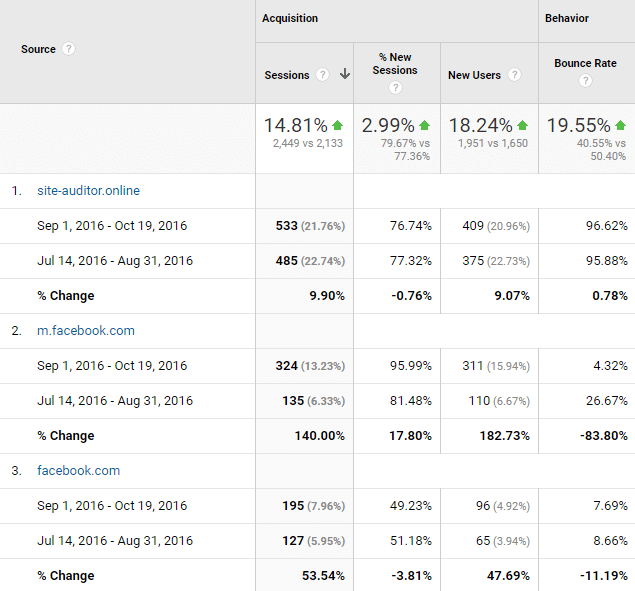
As you can see from the simple comparison above, mobile Facebook traffic saw a 140% increase in Sessions and almost 183% increase in new visitors.
Looking at the desktop version of Facebook, there’s also an increase there (though not to the same level of mobile). More than 53% new Sessions, and almost 48% increase in new visitors.
This suggests that mobile sharing is far more effective (and most mobile browsers have built-in sharing options, so no need for on-page buttons) and that it’s not just the same Facebook users/visitors who are manually sharing and clicking through.
Which, if your goal is to continue growing a new audience while looking after your existing one, is a nice metric to see.
The final goal comparison for me was subscribers, and how removing any distraction would alter that.
- Six weeks with sharing options on: 147 new subscribers
- Six weeks with sharing options off: 361 new subscribers (of which 207 came from the after content sign up form)
That’s quite the jump.
Given the level of content output remained the same, both anecdotal and empirical evidence would suggest the lack of sharing options alongside the after content subscription form focused attention on my goal – subscribers.
Especially since before switching off the sharing options, the majority of my conversions for subscribers came via my Exit Intent pop-up box.
Social Sharing is Not for Everyone, and Some Caveats
For me, given this is the second time I’ve run this experiment, and the results are pretty much the same both times, social sharing options on-page aren’t an effective tactic.
Indeed, the goals I have for my blog are almost universally met by removing the buttons and truly focusing attention on what really matters – content, conversion, engagement.
It’s not just me, either.
A couple of weeks back, I received an email from Benjamin Houy, of FrenchTogether.com. Benjamin has a much higher trafficked site than I do and had come across my post on sharing buttons.
He was curious about the usefulness of social sharing buttons too, as he’d carried out similar experiments to mine in the past and these had been inconclusive.
Benjamin and I have been exchanging emails over the last few days, and his own findings are pretty interesting:


As you can see from Benjamin’s social data above, social traffic also plays a small part in his bigger traffic picture, accounting for only 1,300+ Sessions from an overall 193,000 sessions.
But social sharing options on-page (in Benjamin’s case, Social Warfare) accounted for about 10% of all Social Sessions.
Note: As you can see, Social Warfare is being tracked from the beginning of October, so I’m only comparing the date range it was switched on when looking at how it contributed to social media metrics.
As Benjamin himself mentions, it’s clear to him that – for his site and traffic, at least – most people are sharing manually on social media, or using browser extensions like Buffer, as shown by Benjamin’s comparison between on-page buttons and Buffer’s browser app.


Which brings up the question: do you need social media sharing buttons on your blog or website? I’d suggest no – but with some caveats.
- This analysis is based on my blog, which has been going for eight years, so I (technically) should have an audience willing to share regardless of methodology;
- A third of my audience is mobile-first, meaning they more than likely use mobile browser sharing versus on-page;
- 60% of my audience fall within the 18-34 age group, meaning (again) mobile browsing would be their first option;
- Three of the Top Five interest groups of my traffic relate to Technology, Mobile, and Social Media Enthusiasts, indicating they aren’t averse to using browser extensions and sharing directly via copy/paste linking.
For your own blog, the results might be very different, and your audience make-up could include visitors that prefer on-page sharing of some form or another.
Additionally, new blogs without a decent subscriber base may find it easier to build awareness via social sharing buttons and a strong call-to-action to share a post via these buttons.
Like anything, your own data and knowledge should drive your decisions.
The one thing I would say, though, is that with social networks increasingly trying to keep you on their platforms when it comes to content (Facebook Instant, Facebook Notes, Twitter Moments, LinkedIn Pulse), social sharing looks to be fighting a multi-front battle.
If your concentration lies towards getting shares that drive traffic to your site and you think on-page buttons are the way to do that, make sure that thinking is backed up by hard data from your analytics.
My data, and that of Benjamin’s, suggest on-page options are not the driver of traffic many people feel they are. Instead, manual sharing (where readers can add extra thoughts of their own to the share) would appear to be more effective.
Check your analytics. Check your own experiences. Compare your goals to how social sharing is impacting these goals, and especially compare which sharing option is driving toward them.
Then make a calculated and educated decision on whether sharing buttons are really needed, or if they’re just a distraction.
If they turn out to be a distraction, why continue to use them?