• Skip to primary navigation
  • Skip to main content
Danny Brown

Danny Brown

podcaster - author - creator

  • About
  • Podcasts
  • Journal

content curation

The Sunday Share: 10 Tips to Curate Content Like a Rock Star

sticky content

video and content marketing

As a business resource,?Slideshare?stands pretty much head and shoulders above most other content platforms.

From presentations to educational content and more, you can find information and curated media on pretty much any topic you have an interest in.

As a research solution, Slideshare offers analysis from some of the smartest minds on the web across all verticals.

These include standard presentations, videos, multimedia and more.

Which brings us to this week?s Sunday Share.

Every week, I?ll be sharing a presentation that catches my eye and where I feel you might be interested in the information inside. These will range from business to content to social media to marketing and more.

This week, a short but useful look at content curation from curation platform Scoop.it.

As brands look to content to help them stand out across the social web, being able to present that content in the best manner is becoming key. Here are 10 tips to help meet that goal.

Enjoy.

image: Lift

Beautiful Content Curation with TwineSocial Social Hub

TwineSocial Social Media Content Curation

As content continues to lead the digital marketing charge for brands and content creators alike, one of the “side effects”, if you like, is the evolution in how content is being presented.

While blogging in text form remains popular, content creators are looking for newer, more impacting solutions. One such solution enjoying increased popularity are the rich media curation platforms. You just need to look at the success of Pinterest to see how collective images can tell a far richer story than any written word.

Taking Pinterest one step further and offering a true social hub, and hoping to become a standard for brands and content creators alike, is TwineSocial.

TwineSocial and Rich (Social) Media

Anyone can create a social hub. There have been countless examples already – some excellent (RebelMouse and Keyhole, which I’ll be looking at soon), some not so much. However, RebelMouse is more geared towards personal content curation?- TwineSocial, on the other hand, is about the integrated experience.

Connecting Your Social Graph

When you first create your TwineSocial account, the first thing you’ll need to do is connect your various social accounts. However, instead of simply connecting your Facebook, Twitter and other standard accounts, you can also select hashtags and search terms around your brand.

Twine Social Threads

As well as the usual suspects, TwineSocial also supports Vine, Vimeo, Flickr and other networks that usually get bypassed by many other curation solutions.

The ability to include hashtags as well as multiple accounts and RSS feeds enables you to create the complete picture around you or your business. Not only that, but peers and colleagues/internal teams can be integrated as well.

The TwineSocial Brand Ecosystem

For example, in my account settings, I have my own standard inclusions – my Twitter account, Facebook, Google+, etc. I also have the #influencemktg hashtag, which my Influence Marketing book co-author Sam Fiorella and I use to continue the influence discussion outlined in the book.

Speaking of Sam, I can feature his account as one of interest, via the TwineSocial Connections feature. This essentially allows the curator to highlight social accounts, people, brands or topics they feel would be interesting to their own social graph.

TwineSocial Connections

This Connection feature is available across your chosen social accounts, so if your business has multiple sales teams based on demographic and locale, or your company blog is broken into various sub-sections for your company’s products, you can highlight these different channels as part of your bigger corporate picture.

Or, as a content creator, blogger, podcaster or otherwise, you can bring any other content you own into the fold as recommended channel partners. Or feature the accounts of your podcast guests, etc.

Highlighting Your Key Content

Depending on the size of your business, or how much content you create (or contribute to) as part of your content strategy, your latest stories or updates could potentially be lost soon after they’re published.

To counter that, TwineSocial offers a Pin option. Much like its almost-namesake, this enables a Pinterest-like feature that allows you to keep the most important content front and centre at all times.

Not only that, but when a visitor to your hub selects a particular piece to dig deeper into, it expands into a feature area, while still keeping your live feed behind it.

Twine Social Danny Brown

This offers two benefits – you can choose which content is the one driving the most interest, based on your goals for that period, and you can cross-promote not only your own content, but channel partners for joint promotions.

For example, your content could be the lead hub, your channel partners could be the related products or services surrounding the lead hub. This kind of flexibility could be key in differentiating your product offering in a more visually appealing way than your competitors.

Twine Social – The Verdict

I’ll be the first to admit, I love the direction TwineSocial is taking. The user interface is clean, uncluttered and very easy to navigate – something some of the other hubs have struggled to accomplish.

Additionally, TwineSocial is placing emphasis on the visual appeal of all your content, not just the rich media that you use for an article, blog post or video. The layout of the hub is slick, and the bold images and typography catches the eye of visitors to the hub.

I can see this being used by all kinds of content creators. Brands are obvious, as are producers of multiple content – text bloggers that also use video, for example, or graphic-heavy content (designers, for example).

The cost is attractive too, with plans for all pockets and budgets.

TwineSocial Pricing

The free version is a great starting point for anyone looking to try the product, while the full-on Enterprise solution offers the promotion of other accounts, white labeled / no TwineSocial branding, custom CSS to replicate your own brand identity, and more. For $399 per month, it could be a great way to collate a brand’s social activity and use to entice new employees, clients, partners and more.

It’s not perfect, though.

On Making Twine Social Even Better

At the moment, it doesn’t offer any analytics around the effectiveness of the hub. For example, it’d be great to see which areas of the hub are garnering the most eyeballs or clicks; it’d also be great to see which parts of the hub drove traffic to a landing page, or which one was shared the most. This would allow you to tailor the hub content more efficiently.

Additionally, it’d be great for visitors to be able to visit a hub and embed a specific section.

So, let’s say I’m writing a piece on social analytics software. I could go to a hub for something like Pulse Analytics, grab a section that compares solutions and their impact on ROI, and embed that directly to my post. If anyone clicked on the embed in my post, it would take them to the Pulse Analytics hub, and all the data the visitor is clearly interested in.

It also uses Klout scores as a measurement of who your most influential followers are – the less said about that, the better..! 😉

There are also some bugs in the current build. For example, I had issues trying to grab the embed code for my hub to embed it in a page on this blog, to show you what it looks like when integrated with your other content. Additionally, when you add new social accounts, it pulls all of that content to the top of the hub, as opposed to dropping it in by date of the content itself.

However, analytics is on the way, and the embed option is something Aaron Fessler, CEO of TwineSocial, agreed could be a cool feature addition in future iterations when I spoke with him recently about the product. And bugs are always to be expected on beta products (as long as they’re ironed out in future updates).

In the meantime, as I mentioned I am liking the direction and simple approach TwineSocial is taking. As content continues to be an important part of the marketing landscape moving forward, the more your content stands out, the more opportunities should come your brand’s way.

TwineSocial offers that stand out effect in spades.

Disclosure – I was given full access to the Enterprise solution in order to evaluate TwineSocial’s feature set. However, all opinions are mine. You can check out TwineSocial for yourself here.

How Visual Curation Can Help Tell a Brand’s Story

Clipsi Content Fosters Collaboration

Clipsi Content Fosters Collaboration

When it comes to helping define what your brand stands for and, by association, helping potential customers or clients see whether you’re a good fit for each other or not, visual content curation is a hugely effective solution.

While I’m not sold on the current trend that “to be a successful brand, you need to be a storyteller” – both Sam Fiorella and Hessie Jones offer valid opinions as to why this isn’t the case – I won’t dispute how a brand’s story can add to the overall appeal.

Knowing the history of a brand, what made it the success it is today, and how this has defined their culture of success, can tell us a lot about the culture of the organization in question. For some customers, that can be the final persuasive factor in giving that brand their business.

Since humans by nature are very visual creatures, the ability for brands to share their story in a more appealing way than simple news clippings and print publications seems a no-brainer.

Two companies who agree are Vizify and Clipsi.

Vizify – A Life Told in Rich Media

Danny Brown Vizify

In the company’s own words, Portland, Oregon-based Vizify is a “graphical bio” or “visual representation of you”. From their website on why you should use Vizify:

Like it or not, people look you up online before they interview, hire, or date you. Make sure they see your best.

Now while I’m not sure if having a visual representation of yourself for would-be suitors to view you is a great idea, especially in this looks-driven world we live in today, the rest of Vizify’s premise makes perfect business sense.

For job-seekers, it’s a great way to present yourself and your social footprint to potential future employees. By the same token, it’s a great way for headhunters and recruiters to see if a potential candidate is right for the client they represent.

Going a little deeper, and brands can use Vizify to showcase not only their mantra, but how they uphold that online.

While the format is a little more suited to a more visual presentation of a resume, the same features that make up Vizify from a personal angle can also be utilized for a business or brand.

  • Multiple Twitter accounts can show the diversity of your company’s approach to social, from customer service to support to FAQs and more.
  • Images can share corporate events, team building, awards, employee news and milestones, as well as customer satisfaction stories.
  • Videos can highlight the topics you discuss online as well as the people who influence your brand, to show if there’s a correlation for a potential customer.

In addition to these, there’s a nifty Words feature that shows the words you use the most, which gives a great indication of whether your brand’s expertise or areas of interest tie in with those of your customers. As you can see by the image below, if anyone’s interested in talking influence with their mates, I might be your guy!

Danny Brown Vizify words

Additionally, for any customer looking to do some more digging on your brand, Vizify offers a handy Links feature that connects the dots to your online footprints.

Throw in the ability to customize to your brand’s design and some basic analytics behind how your content is being viewed, and Vizify offers a clean and simply way to showcase what your brand’s about when it comes to social.

Clipsi – The New Corporate Media Room

There have been numerous ways to create an online news room that highlights your company’s most important news, milestones and achievements, but recently released Clipsi offers a slick take on it.

By grabbing text or images – or clippings, for the old school amongst us, including me – from either public web pages, or documents from your Dropbox account, Clipsi then lets you arrange them to present an informative and interactive newsroom.

As you can see by the embedded example below, which Neicole Crepeau – the driving force behind Clipsi – kindly put together for me around the topic of the Influence Marketing book.

By collating quotes from blogs, interviews as well as directly from the book, and the research that took place around the case studies and technology vendors in the influence marketing space, this particular Clipsi offers a pretty good feel for the direction the book takes.

However, as cool as the newsroom offering is, it’s where Clipsi is taking steps beyond just offering a public-facing news curation area, and looking to make the platform a true team tool for cross-collaboration, that things get really interesting.

Say you want to create a report or marketing strategy based on what you know about today’s marketplace and where your brand fits in. With Clipsi, you could create a team research board, invite colleagues from relevant departments, and collectively collate any data you feel offers insights into the topic at hand.

With instant visual reference points, as well as clickable links to take you directly to the source, Clipsi moves from being an effective newsroom into a research-driven strategic solution. The example board below, “Social Media is Crack”, is a great example of this approach.

Statistics, research links, authority reports and sources ensure the most up-to-date analysis for your team, which in turn means the most up-to-date reports for your company’s leadership team.

Described by Neicole as “Pinterest for business”, the analogy is apt – yet, for me, Clipsi offers much more of a business solution than the popular image curation board it’s compared to.

Clipsi is currently in beta – you can find more details here.

The Media is the Message

There’s no doubt that businesses are using visuals more in their content creation. Twitter’s introduction of Cards, and the redesigned Google+ and Facebook interface that favours rich media, shows this trend is only going to continue.

As brands look to compete in an ever-noisy space, the ability to show and tell versus just tell is a key ally. Vizify and Clipsi understand this and are helping redefine how we both represent and consume information.

While blogs and social accounts will continue to help these brands position themselves to their would-be customers or future employees, the ability to go a little deeper from a central point makes that positioning a little more attractive on both sides.

Where the media truly is the message, ?don’t let your brand miss out on sharing its version.

Why I’m Hesitant About Triberr

Triberr - The Reach Multiplier

Triberr - The Reach Multiplier

This is a guest post by Neicole Crepeau.

Triberr is taking the blogging world by storm. And my hat is off to its creators, Dino Dogan and Daniel Cristo for trying to help smaller bloggers like myself get exposure.

I can definitely understand the appeal of Triberr, Twitterfeed, and other RSS auto-post systems. I find myself hesitant to use them, though. As a content curator, they don?t meet my needs?and?I?m worried they?re just adding to the noise.

Triberr, Twitterfeed, and Similar Tools

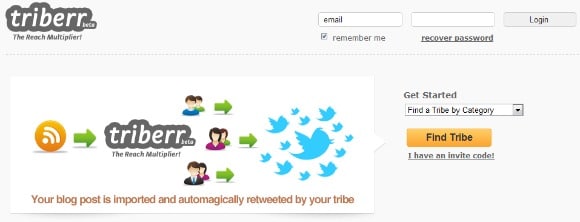
Triberr offers a quid-pro-quo arrangement with other bloggers. You become part of up to four tribes. They tweet your blog posts (the timing handled by Triberr), and you tweet their?s. By default, this just happens automatically without you having to think about it.

(Note that Triberr recently did add a feature that allows you to change your settings so that you can choose which content to tweet. It was built for and optimized for auto-tweeting, though, and that?s the scenario I?m discussing.)

Triberr makes the quid-pro-quo arrangement explicit?and fun. These kinds of arrangements have been taking place informally for a long time. ?Most of us active in content creation also share other people?s content on a regular basis, and we naturally end up with a specific set of bloggers or sources whose content we tend to read and share.

Reaching a Larger Audience

Of course, we all want our content to reach a larger audience.?It?s one of the key reasons we participate in social media. It?s one of the reasons that we share other bloggers? content.

Triberr touts the increased reach that bloggers get by joining tribes. Its tagline is ?The Reach Multiplier!?. So,?ultimately, like an advertising network, it?s about getting views and clicks. I have no doubt that using Triberr, or any quid-pro-quo system, will get my links in front of more people. The problem is two-fold:

  • Are my links getting in front of the right audience?
  • Am I short-changing my audience to do it?

Content Curation versus Content Inundation

As I said, I consider myself a content curator. I am selective about the posts that I share. ?I take pride in reading each one before sharing it. ?I share content that I think my particular audience, or the audience I?m trying to build, will find of value. I know they are flooded with content. I like to think they trust that what I share is going to be worth clicking on.

There are bloggers whose content I routinely share. Even with those bloggers, though, I don?t share every post. Even for the blogs I helped start (SMB Collective)?or am a regular contributor to (Mark Schaefer?s?Grow blog), I don?t share every post. I share those that are?relevant to my audience and?of high quality.

If a person auto-tweets every post from my blog, then they aren?t being selective. They aren?t choosing the posts relevant to their audience. I bet they don?t have a quality bar, either. Yes, I want my content to be shared. But?what I really want is for my content to be shared by someone whose judgement his or her followers trust, and whose audience is the target audience I?m trying to reach.

We are inundated with information, links, content. The problem is just getting worse. When people auto-share every post from everyone in their network, they just add to the problem, inundating people with more links.

The Value of the Curator

That?s why I personally think that?true curators are going to become more valuable. As we try to filter out all the junk and focus our time on consuming really good content, we will rely on selected tools and selected individuals.

Some websites and applications are trying to help surface the best content to those who are seeking it. There will be a role for these tools: Flipboard, Zite, Alltop, and the like. They will be locations for people to go to when they are in the consumption mode, actively looking for information on a topic or ready to sit down and do their daily reading.

More and more, though,?people get their content primarily in small snippets, through friends and their online networks. They receive it in small chunks: a post on Facebook, or LinkedIn, or Twitter. They click because a particular headline grabs them.

There is evidence to suggest that we are?becoming more selective about the pages we Like. Similarly, as content marketing and the content volume grows,?we?ll become more selective about the people we follow. As a blogger or curator trying to build an audience, it will become even more important to pick your niche and create and share quality content about your selected topic. People will choose to follow and to really pay attention to the content shared by curators who have proved themselves trustworthy.

For that reason, and just my own personal integrity, I?m not willing to auto-tweet. I don?t want to be part of the problem, and I want to maintain my own reputation?because I think?having a reputation as a good content curator is going to become more and more valuable.

What about you? Can automated syndication work, or does manual curation seem the better approach?

Neicole CrepeauAbout the author: Neicole Crepeau is a speaker, blogger, columnist at {grow}, and co-founder of SMB Collective. She works at Coherent Interactive on social media, website design, mobile apps, & marketing. Connect with Neicole on Twitter at @neicolec.

© 2026 Danny Brown - Made with ♥ on Genesis