
A few months back, I asked the question as to whether it was time to get rid of the trusty RSS option on your blog.
My key reasons were simple: RSS offers less one-to-one interaction than email, the format of RSS can be clunky and unwieldy for non-techy folks, and the traffic to my blog from RSS was far outstripped by search, email and social network traffic.
The post received some interesting thoughts, both in the comments section and across Google+ and Facebook. Many agreed that RSS is no longer a required option; others felt it offered much better benefits based on niche and industry.
My own personal take remained – RSS was a platform that was out-of-date and no longer the lead choice for bloggers and content creators.
While that’s still mostly true, Feedio has made me look at RSS ?a little differently, and have it actually show value. Here’s why.
User-Friendly and Clean User Interface
One of the biggest bugbears of mine when it came to existing RSS platforms (with perhaps the exception of Feedly) is the user interface (UI) on the front-end could be very unwieldy.
You click the “subscribe by RSS button” on a blog, and it usually takes you to a page where you have a list of RSS subscription options to use. Unless you know what various RSS terminology means (Atom 2.0, RSS 2.0, SubToMe, BittyBrowser, etc.), it can be overwhelming for the average reader.
Feedio does away with this by offering a clean and simple subscription option for your reader.

By offering just RSS or Feedly, Feedio makes it easy to use your existing RSS set-up without having to go through a whole list of confusing options.
A much better solution, for this non-RSS fan.
Simple, Quick Stats Dashboard and Analytics
The main “complaint” I have with RSS is the lack of details about your subscribers. When compared to the insane amount of data available to you from email providers, RSS is sorely lacking in this department.
While Feedio doesn’t (yet) go to deep levels of analytics, it does give you some useful information via both the Dashboard and the Posts navigation tabs.
Quick Stats Dashboard
When you log into Feedio, you’re greeted by your dashboard, that gives you a quick breakdown of subscribers and post reach.

Since I recently switched over to Feedio from Feedburner, the importing/redirect process is still going through. However, even with the subscribers imported so far, you can start to get a feel for how they’re subscribing, as well as what type of content they’re consuming the most.
One of the more interesting features is the “Unlock” option, which you’ll see in the right-hand column of the Newest Posts section (click to expand if required).
This comes into play if you also use Feedio for email subscriptions, and lets you know which post resulted in a new subscriber. This is a really cool feature that can help you laser in on the type of content that will grow your email subscriber base.
Simple Site Analytics
As well as the RSS and subscriber data, Feedio also gives you a little more insight into your posting frequency, and where your content is being shared the most, with the analytics on your Sites tab.

As well as showing you the Total Reach of your posts from RSS, Feedio lets you see how many times your post was shared on Twitter, Facebook and Google+.
Again, the benefit of this is if you have certain goals for awareness of your content by channel, this gives you a quick look into how well you’re doing in achieving that goal.
As I mentioned earlier, it’s not super deep analytics, but it’s a nice little feature and beats having no insights into that data at all.
Smart Engage to Build Community and Loyalty
Perhaps one of the smartest features (no pun intended) is the Smart Engage option.
Currently set up for Twitter (though I believe more networks are in the pipeline), Smart Engage gives you an overview of who’s sharing your content on Twitter.
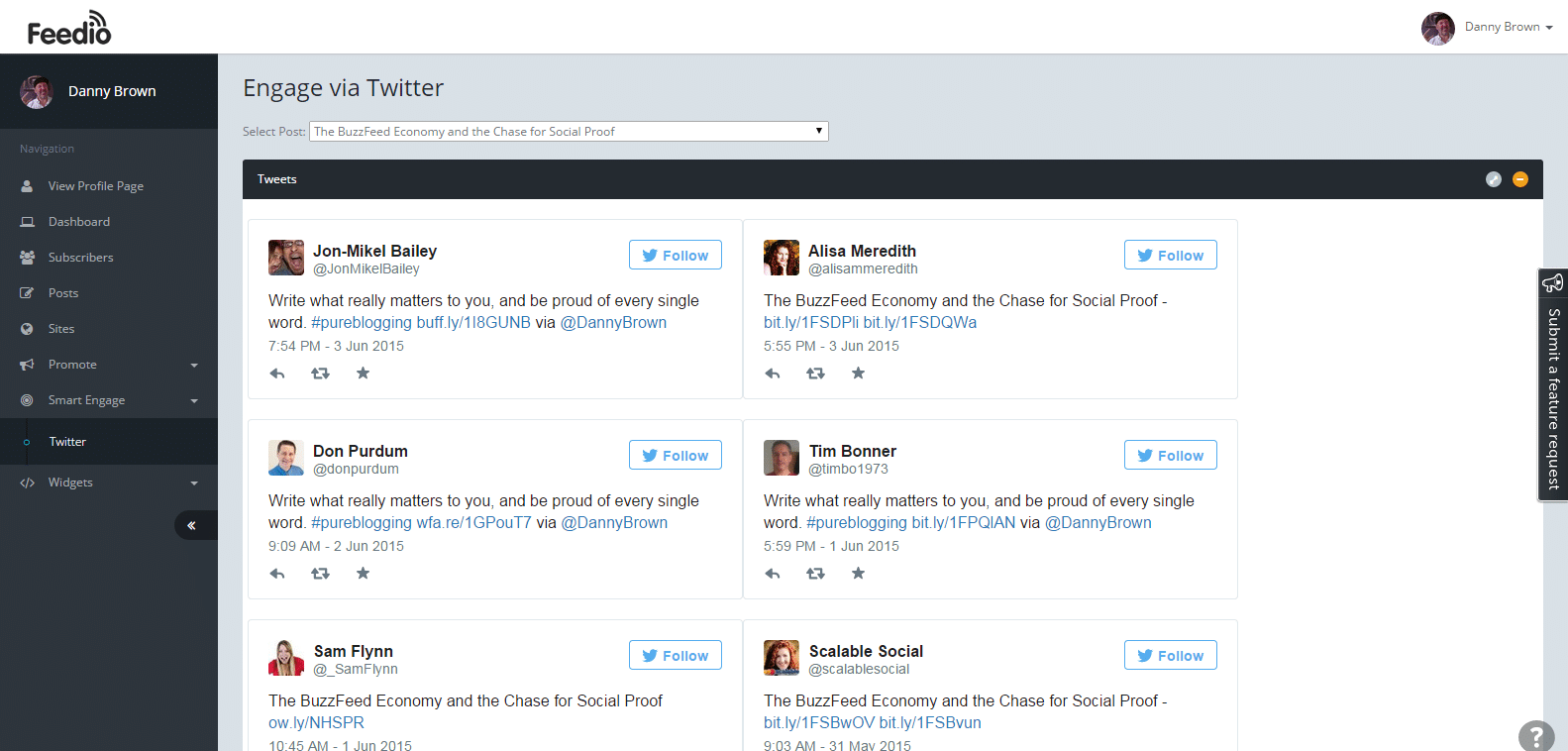
Given you can miss this information pretty easily if the person sharing doesn’t tag you with your username, Smart Engage ensures you can see not only the type of content being shared, but who’s sharing it and how often.
Using this feature, you could create a Twitter list called “Content Advocates”, for example, and then begin sharing their content too, as well as finding out more about that person and the kind of content they enjoy.
Additionally, you could simply send a quick thank you, and start to build a relationship with that person, growing not only your reach but finding a potential new avenue for ideas, shares and comments.
[clickToTweet tweet=”It’s not just RSS that @GetFeedio grows, it’s community and loyalty. #content” quote=”It’s not just RSS numbers that Feedio grows, it’s community and loyalty too.”]
It’s a simple but useful solution that does more than your average RSS reader, and offers more reward because of it.
Simple Promote Options
While your blog readers will always be able to choose between email and RSS subscriptions, there’s still a lot of traffic and subscribers that you could be missing out on – social media connections, for example.
Feedio takes care of this with their simple promote option, like this one for Twitter.

By providing some recommended tweets, you can let your followers know about your Feedio subscription options, which in turn should (hopefully) grow your subscriber base as well as awareness of your content.
There’s also an email section that provides some recommended emails, which you can copy and paste into an email of your own and send to past connections, chosen peers and colleagues, etc.
What Feedio Needs Next
As you can see, despite my continued misgivings about RSS as a subscriber option, Feedio does do a lot more than your standard RSS providers on the market today.
The fact it does it so cleanly and elegantly is a major plus. However, there are still some features I’d love to see added to take it to the next level of RSS providers.
- Google Analytics implementation. One of the things that separates email from RSS is the way you can get really granular on the data, via Google Analytics. It’d be great if Feedio could connect to your GA account, and show which post (based on Reach and Shares) drove the most activity around the content from RSS.
- Trending content. One feature I’d really like to see is that of trending content, with a little Up/Down arrow next to the posts in your dashboard. This could let you take advantage by sharing again on your own networks, or writing a complementary piece and linking to it from the trending post.
- Deeper analytics on Smart Engage. While it’s great to see who’s sharing your posts on Twitter via the Smart Engage option, it’d be great to see the actions taken on that tweet by followers of that person (retweets, favourites, clicks). I’m not sure how feasible this would be, but it would definitely be a great addition.
- More personalization options for your profile page. Currently, Feedio offers some personalization options for your front-end profile (the one subscribers see). However, it’d be nice to have some more features like colour picker for links, hyperlinked URL’s, etc. A small change, but one that would make a nice addition.
In fairness, though, while I’d love to see the suggestions above make it into Feedio somewhere down the line, I have to tip my hat to?Justin Butlion and the team behind Feedio.
They’ve clearly looked at the current RSS landscape, and understood the pain points for both bloggers and readers, and actually made RSS enjoyable again.
Not only that, but while they haven’t fully converted me into an RSS lover again, they have made me reevaluate my take on the service.?Given I’m a stubborn bugger when it comes to stuff like this, that’s no small feat, so kudos. 😉
You can check Feedio out for yourself here – and if you want to subscribe to this blog via RSS/Feedly, you can do that here.




![Reblog this post [with Zemanta]](http://img.zemanta.com/reblog_e.png?x-id=03304beb-5870-44ec-acad-492f8d2505ea)